
While the Contact Form 7 plugin is wildly popular amongst millions of WordPress users, many people may not be aware of these really useful free Contact Form 7 Extensions.
As one on the most popular plugins in the WordPress Plugin Repository it is perhaps not surprising that WordPress Developers would be willing to spend their time developing and releasing plugins that extend Contact Form 7’s natural capabilities.
Indeed the range is such that Contact Form 7 with it’s extensions can give users many of the functions available in some of the well known premium form plugins.
The advantage in sticking with Contact Form 7 is often familiarity with the Contact Form 7 form plugin. The learning curve for some of the premium form plugins can be substantial. If you only require one or two extra features, and not the large range of extra functionality available in the premium form plugins, it can make a lot of sense to use a Contact Form 7 extension or two.
In this article, our aim is to make people aware of some very useful Contact Form 7 extensions, what they do and how they can be used to meet additional needs that WordPress users may have with their website forms.
Contact Form 7 with it’s extensions can give users many of the functions available in some of the well known premium form plugins
Really Useful Contact Form 7 Extensions
- Contact Form DB – Store Form Submission Data
- Contact Form 7 Dynamic Text Extension – Access Form Variables
- MailChimp for WordPress – Connect to MailChimp
- Contact Form 7 Honeypot – Prevent Form Spam
- Contact Form 7 Skins – Form Styling
1. Store Form Submission Data
Store your Contact Form 7 form submission data in the WP database
Contact Form DB
Saves submitted form data to the database and provides short codes to display it.
Using a submission storage plugin like Contact Form DB will save all your Contact Form 7 form submits to the WordPress database. These are often used by experienced WP users – they provide a robust record of all form submissions even when things go a little wrong.
The submission storage plugins are very robust and rarely fail to save a CF7 form submit even if the email is not sent due to a Javascript Conflict or other email sending problem.
+ Display data
As a bonus, Contact Form DB now works with all of the following popular WordPress form plugins:
- JetPack Contact Form plugin
- Fast Secure Contact Form (FSCF) plugin
- Gravity Forms plugin
- WR ContactForm plugin
- Quform plugin (BETA)
- Ninja Forms plugin (BETA)
- Caldera Forms plugin (BETA)
So you can maintain your form submission data even if you change to another form plugin.
Further reading:
Website – http://cfdbplugin.com/
2. Dynamically Set Form Field Values
Add dynamic content capabilities – dynamically set the default values of your Contact Form 7 fields
Contact Form 7 Dynamic Text Extension
Allows the dynamic generation of content for a text input box via any shortcode
This extension lets you create pre-populated fields based on … (other values). Some examples might include:
Auto-filling a URL, Post ID, title, or slug
Pre-populating a Product Number
Referencing other content on the site
Populating with post or user info
Including info from custom fields
The plugin provides a dynamic text field CF7 tag type for the Contact Form 7 Plugin. It allows the dynamic generation of content for a text input box via any shortcode.
Provides a dynamic text field that accepts any shortcode to generate the content.
+ Any value you can write a shortcode for
Further reading:
- How to Create a Dynamic WordPress Contact Form
- How to Dynamically Set the Recipient (To) Email Address in Contact Form 7
- How to add dynamic values into Contact Form 7 inputs
- Auto Populate Contact Form 7 Input Fields with URL Parameter
- Getting Default Values from the Context
Website – Contact Form 7 – Dynamic Text Extension
3. Connect to MailChimp
Text
MailChimp for WordPress
Add MailChimp sign-up checkboxes to your Contact Form 7 forms
Further reading:
Website – http://cf7skins.com/
4. Prevent Form Spam
Text
Contact Form 7 Honeypot
Adds honeypot anti-spam functionality to CF7 forms.
This simple addition to the Contact Form 7 plugin adds basic honeypot anti-spam functionality to thwart spambots without the need for an ugly captcha.
The principle of a honeypot is simple — bots are stupid. While some spam is hand-delivered, the vast majority is submitted by bots scripted in a specific (wide-scope) way to submit spam to the largest number of form types. In this way they somewhat blindly fill in fields, regardless of whether the field should be filled in or not. This is how a honeypot catches the bot — it introduces an additional field in the form that if filled out will cause the form not to validate.
Further reading:
Website – Contact Form 7 Honeypot plugin page
5. Form Styling
Text
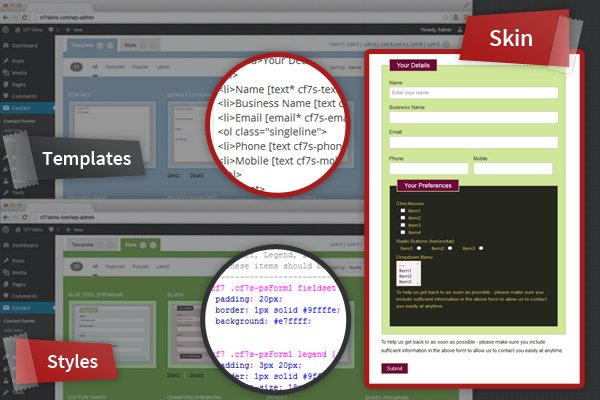
Contact Form 7 Skins
Makes styling of Contact Form 7 forms much easier – even if you don’t have HTML + CSS skills.
Further reading:
Website – http://cf7skins.com/
 As one of the most popular WordPress plugins,



 I’m Neil Murray aka
