
Last Updated on April 4, 2021 by Neil Murray
CSS Modules #
We use CSS Modules in our CSS configuration, so that other plugins & themes used in the WordPress environment, can’t interfere with our styles.
CSS Modules uses a module bundler in webpack to generate a unique name for each CSS class.
We set a dynamic name on every style using
[local]___[hash:base64:5]in webpack and css-loader.
Using CSS Modules with React #
In the context of React, CSS Modules looks like this:
/* index.css */
.edit {
  background: #fff;
  padding: 15px;
  margin: 0 0 7% 0;
}
/* index.js */
import styles from './index.css';

class Edit extends Component {
  render() {
    return (
      <div className={ styles.edit }>
        <p>Hello Edit!</p>
	  </div>
    );
  }
}
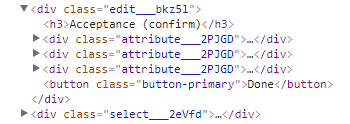
Rendering the component will produce HTML markup with uniquely identified CSS classes and a corresponding CSS style that matches those CSS classes.
/* render result */
<div class="edit___bkz5l">
  <p>Hello Edit!</p>
</div>
Example result viewed with browser Developer Tools HTML inspector.
Switching Scope #
It is sometimes necessary to switch the scope of our CSS classes to avoid issues caused by our use of CSS Modules.
For example, packages that set a static className in their component may fail to apply their styles, because CSS Modules changes their .css classname in our webpack configuration.
:globalswitches to global scope for the current selector identifier:global(.xxx)declares the stuff in parenthesis in the global scope:localand:local(...)for local scope
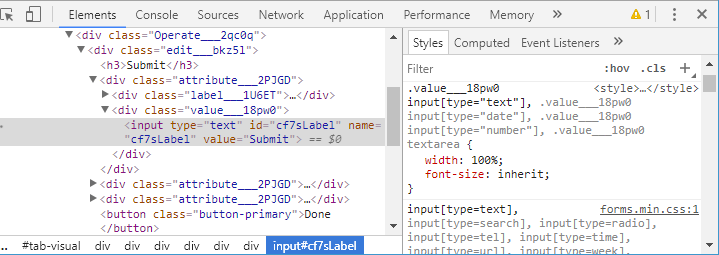
Example using global scope to overwrite WordPress default styles
/* index.css */
.value :global input[type="text"],
.value :global input[type="date"],
.value :global input[type="number"],
.value :global textarea {
    width: 100%;
    font-size: inherit;
}
Example result viewed with browser Developer Tools HTML inspector:
Further reading:
- CSS Modules – global scope
- Explain what :global does (Bitbucket Issue)
Required npm modules #
To enable CSS modules in webpack we include both style-loader and css-loader and add enable CSS Modules.
webpack.config.js

{
	test: /\.css$/,
	use: [
		require.resolve( 'style-loader' ),
		{
			loader: require.resolve( 'css-loader' ),
			query: {
				// Enable CSS Modules
				modules: true,
				// Unique hash generated for every build
				localIdentName: '[local]___[hash:base64:5]',
			},
		},
	]
}
Assets #
We can also use url-loader to embed small PNG/JPG/GIF/SVG images as well as fonts as Data URLs and copy larger files to the output directory.
webpack.config.js

module.exports = {
  module: {
    rules: [
      {
        test: /\.(png|jpg|gif|svg|eot|ttf|woff|woff2)$/,
        loader: 'url-loader',
        options: {
          limit: 10000
        }
      }
    ]
  }
}