
Last Updated on October 26, 2024 by Neil Murray
All JavaScript & CSS used in the CF7 Skins Visual interface, is built using webpack.
All React development files are contained in ..\cf7skins-single\src\ which are built to ..\cf7skins-single\dist\ & ..\cf7skins-single\build\ by webpack.
create-react-app #
We are using an ejected version of create-react-app (CRA).
CRA customization #
We have customized the following CRA webpack.config files:
- webpack.config.dev.js
- webpack.config.prod.js – IN PROGRESS
We do this to ensure operation of the JavaScript interface at localhost:3000 matches with operation in the wp-admin.
2019-04-04 Right now create-react-app uses Webpack 4+
Refer:
- Eject create-react-app (Bitbucket Issue)
webpack build process #
Our Build Scripts #
We adapt the build scripts from create-react-app:
  "scripts": {
    "start": "node scripts/start.js", // local JS development at http://localhost:3000 - changes are reloaded automatically
    "build": "node scripts/build.js", // from create-react-app
    "test": "node scripts/test.js --env=jsdom", // from create-react-app
    "webpack": "webpack" // rebuilds CF7 Skins Visual plugins in wp-admin using local webpack version
  },
Building our WordPress Plugins #
We use webpack to build separate plugin versions of CF7 Skins Visual from a single Git repo at https://bitbucket.org/cf7skins/cf7skins-dev-cf7skins-visual.
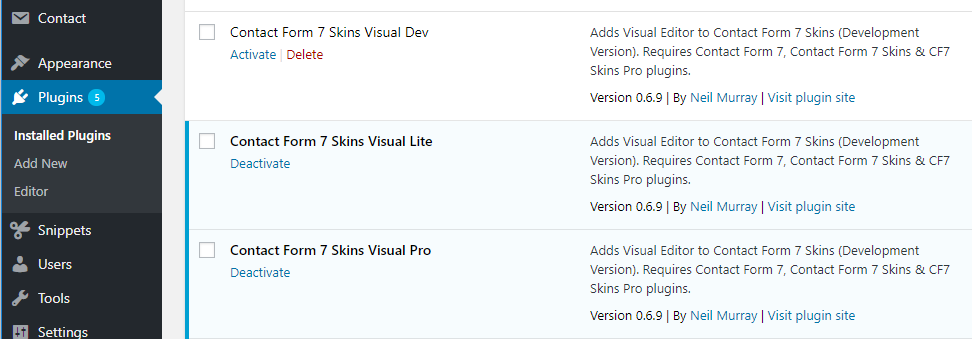
These plugins can be selectively activated in the wp-admin to test how the Visual Editor operates in our different CF7 Skins plugins:
- Visual Dev – Contact Form 7 Skins + CF7 Skins Pro + Add-ons
- Visual Lite – Contact Form 7 Skins only
- Visual Pro – CF7 Skins Pro + Add-ons
NOTE: The JS code generated in CF7 Skins Visual is currently copied manually to our CF7 Skins plugins in their individual Git repositories.
[ADD buildPlugin.js explanation]
Refer:
- Setup CF7 Skins Lite & Pro plugins (Bitbucket Issue)
- Setup webpack for CF7 Skins build process (Bitbucket Issue)
Code Splitting #
We’ve heavily customized the webpack bundling process to ensure that no Add-on code is included in the free version of CF7 Skins – refer Separating Add-on files.
All the JS code for each Add-on is created as a chunk which can be added as a standalone file in the individual Add-on plugin.
Configurations #
To build and split several files, we use multiple configurations  with slightly different webpack
 configurations, entries and output:
baseConfig– base configuration contains webpack default module rules and output for merging with other config.visualConfig– generatevisual.jsfile and all Add-on files as separate chunks.-
- We use
CommonsChunkPluginto build the chunk. - The modules should not be added or repeated into other files because it will generates error – see multiple copies of React loaded error.
- This file should be enqueued first before other chunk files.
- We use
-
addonsConfig– exportaddons.jsintowindow.cf7svisualused by Add-ons.wpConfig–
Heading
We use Lodash.merge() ↗ for merging the config objects by appending child object properties without overriding the source object. Object.assign() ↗ override source object properties with target object.
Refer: webpack multiple configurations
Entries #
We setup webpack entry as an object that contains entry (file) name and its path relative to current webpack config file path. These entries are built into standalone chunk files:
visual.js– common chunk file, contains all required modules, Visual components and functions, a big file size.-
- We use
CommonsChunkPluginto build the chunk. - The modules should not be added or repeated into other files because it will generates error – see multiple copies of React loaded error.
- This file should be enqueued first before other chunk files.
- We use
-
init.js–util.js–wp-i18n.js–addons.js– used by Add-ons to register their component into Visual.pro.js– Add-ons file chunk for Pro plugin.ready.js– Add-ons file chunk for Ready plugin.multi.js– Add-ons file chunk for Multi plugin.
Sample webpack entries:
// visualConfig
entry: {
	visual 	: './src/index.js',
	ready 	: './src/visual/Addons/Ready/index.js',
},

// addonsConfig
entry: {
	addons	: './src/visual/Addons/addons.js',
},
Refer: webpack multiple entries
Output #
For base configuration baseConfig, we build each entry chunk into dist directory with the entry name as filename.
output: {
    filename: "dist/[name].js",
},
String [name] will be replaced by webpack with respective entry name. Read more about webpack output.filename ↗. The output filename will be merged with other configs.
Heading #
output: {
    filename: "dist/[name].js", // after merging
    library: [ 'cf7svisual', '[name]' ], // [name] replaced to `addons`
    libraryTarget: 'window',
},
For add-ons configuration addonsConfig, we use output.library ↗ to output addons.js as a library for other files and output.librarytarget ↗ to expose it on the window global variable. Add-ons can used it by accessing window.cf7svisual.addons.
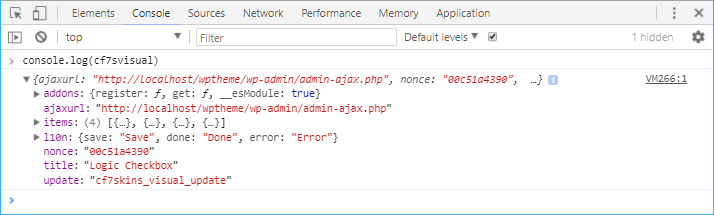
Exposed addons.js into window.cf7svisual
Further Reading:
- Separating Add-on files
- Working with CF7 Skins Add-ons
- webpack multiple configurations
- multiple copies of React loaded
webpack.config.js #
Webpack Plugins #
- CommonsChunkPlugin – generate chunk which contains common modules shared between entry points
- ExtractTextPlugin – extracts CSS into a separate file
- WebpackShellPlugin – runs commands before & after webpack build
In order to use a webpack plugin, you need to require() it and add it to the plugins array. You then need to create an instance of it by calling it with the new operator.
.babelrc #
Babel Presets #
Babel Plugins #
- @babel/plugin-transform-runtime – avoids us using babel-polyfill which can cause conflicts with Yoast etc.
- @babel/plugin-proposal-object-rest-spread –
- @babel/plugin-syntax-dynamic-import – allows us to use code splitting via dynamic imports
- babel-plugin-dynamic-import-node – transpile import() to a deferred require(), for node
- @wordpress/babel-plugin-makepot –
Updating webpack.config.js #
We regularly update our npm package versions in package.json to match updated create-react-app versions.
[ADD explanation of how we do updates]
Update Guidance
We follow these repo’s for guidance when updating webpack.config.js:
- Create React App – create-react-app (CRA)
- Gutenberg
- events-gutenberg
- 10up-plugin-scaffold
- formidable-forms
- google/site-kit-wp
Translation #
[ADD Translation explanation]