Last Updated on December 24, 2020 by Neil Murray
While users reported they have issues with CF7 Skins and addons, we usually grab a copy from database to do testing in our local development using Adminer. But it seem Adminer and other plugin that utilize phpMyAdmin has been blocked for security reason.
Some users avoid to give access to their database. We can simply copy paste the form content or replicate the Logic or Multi tabs for small form, but for large form that using unusual amount of tags and tabs, we will have difficulties to grab it into our local test.
Our plugins uses meta table to store form data. It is based on form ID and can be grabbed using get_post_meta(). Here is the list of meta key used by our plugins and CF7:
- _form, contains data from CF7 textarea.
- cf7s_visual, for Visual data.
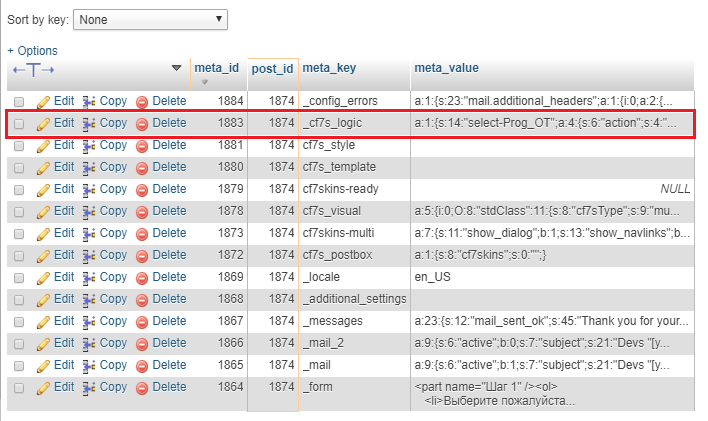
- _cf7s_logic, for Logic.
- cf7skins-multi, for Multi
- cf7skins-ready, for Ready
Here the steps of grabbing serialize data from database to be used on our local. We use Logic in this case.
At User Site
- Go to plugin editor and open any admin file for example, cf7skins-logic/includes/admin.php.
- Select appropriate place inside a function to echo the data. Put this code below to get the data using get_post_meta and serialize, for example inside metabox function. Note, we can use maybe_serialize function but it seem it limit the number characters to show. Please make sure we use correct function to get the current edited form ID.
- Save changes and refresh the form.
- View the HTML source of the page and copy the data.
- Edit or create a CF7 form, make sure it already has a dummy logic saved.
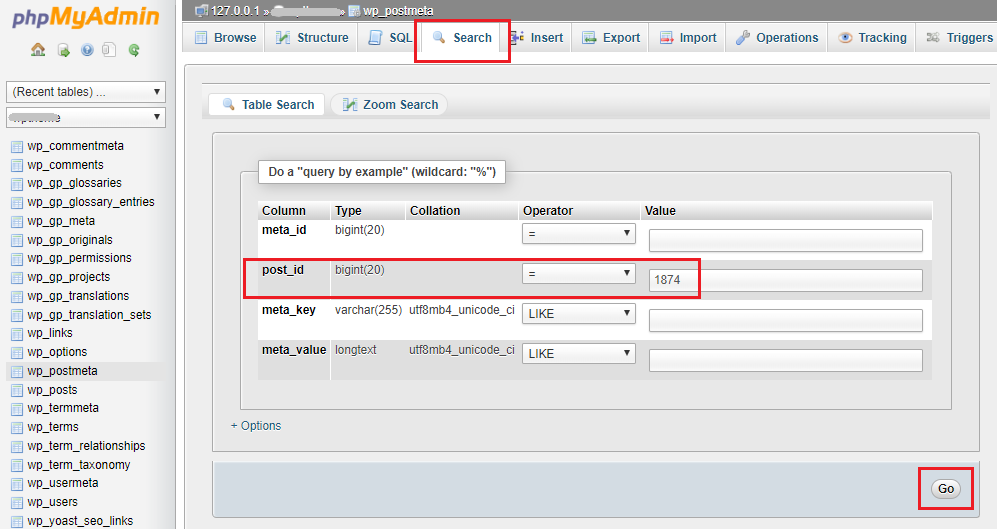
- Go to our local phpMyAdmin page, open wp_postmeta and do search by post_id.
- Find key _cf7s_logic and paste the data to meta value.
At Local
function meta_box( $cf7 ) {
    $meta = get_post_meta( $cf7->id(), '_cf7s_logic', true );
    echo serialize( $meta );
    ...
    ...