
Last Updated on July 3, 2024 by Neil Murray
Table of Contents
- People
- Systems
People #
All remote contractors – see Team Members for information about each person.
Expectations #
Our team members:
- Follow closely our system of working
- Work independently with little guidance
- Complete allocated tasks with very limited support & supervision
- Select their next tasks from long list of required work
- Ask when in doubt – i.e. ask when necessary
- Coordinate with other team members
- Understand the business & think & act like co-business owners
Don’t:
- Don’t ask leaders what they should do today or next
- Don’t expect team leaders to give them tasks 1 by 1
- Don’t ask leaders to tell them how to do a task
- Don’t need to be reminded more than once
- Don’t do the same thing wrong more than once
If you are uncomfortable with consistently meeting these high expectations & don’t like the idea of being held accountable for them in public discussion amongst all team members, you probably won’t enjoy working with us.
Cooperation not Competition #
We want to make sure everyone understands that all of the remote contractors working on this team are not competing for the same jobs,
We are still building this team & have many jobs for many people with various skills.
So what we want to see from all team members is cooperation not competition. We expect to see you working together to help each other.
If you have greater skills in a particular area, you should jump in a help another team member with helpful constructive criticism & advice.
If you have lesser skills in a particular area, you should embrace helpful constructive criticism & advice from another team member.
Please see this as an opportunity to improve both your own skills & the team as a whole.
Task Allocation #
We allocate multiple tasks to all team members. Most of the time people are working on several tasks that are at different stages.
Tasks are also allocated to people based on their skills & experience and in particular their ability to complete allocated tasks with very limited support & supervision.
If you would like more work with us, the best way to get that happening, is to show us that you can work independently with little guidance in a wide range of areas.
- More skills & experience, with the ability to work independently with little guidance, in more areas = more work
- Less skills & experience, with need for some support, supervision & guidance = less work
Experienced team members are also encouraged to find & create their own tasks based on their understanding of:
- our products
- the needs of our customers
- the overall business.
Upward Delegation #
According to Quora, upward or reverse delegation is ‘ … when you delegate to your boss or someone in a higher organizational position than you are‘ in an effort to get them to do what has been tasked to you under the guise of needing help or guidance.
Quora – What is upward delegation?
Our team leaders are constantly on the look our for Upward Delegation. If you are in the habit of doing that in your previous work experiences, you are going to need to avoid doing it here to have a good time working in our team.
Further reading:
- How to Deal with Upward Delegation
- How to Deal with Upward Delegation
- Upward Delegation: How to avoid this kind of monkey business
Availability #
We expect everyone to keep us all informed of their availability. You can update your normal availability times at Team Members or tell us about any short term changes in a Skype group.
If your availability changes for any reason you need to tell us about it before hand.
If you simply tell us before the event, we find we can usually easily adjust to your changed times.
We’ve unfortunately experienced some dishonestly from remote contractors about their absences in the past.
Please be aware that if you tell us about your absence after the event,
we will treat your explanation as doubtful, even if you are telling the truth.
Any unadvised absences are a serious negative for you & damage your relationship with us.
Priorities & planning #
The basic principles we use are:
- We allocate multiple tasks to all team members. Most of the time people are working on several issues that are at different stages.
- Because we are based in different time zones, you cannot count on people being available to answer your questions when you are held up.
- We expect you to manage this yourself by reading & understanding new issues when assigned to you.
If you have any questions, you should ask them early.
- If you wait until you are ready to start before seeking clarification, other team members will generally not be available.
- In any case, you don’t want to interrupt other team members to answer urgent questions from you.
- Instead, let them answer you at a suitable time which does not disrupt their workflow.
- Avoid waiting for a response on any question where you get stuck – think & plan ahead – ask questions early.
Saying you are held up waiting for a response from someone is usually a negative for you – it generally shows poor management by you.
Hours & times #
- We normally start people at 4 – 10 hours per week.
- We find this work’s well while people are learning how we work.
- After team members get a good understanding of how we work & their role, we often look for people to work 20+ hours per week.
- While learning your role, you should work part of your day during your supervisor’s working hours. This time overlap can stop when you’ve shown you can complete allocated tasks with very limited support & supervision.
- Typically team members break up their time to suit our work needs & other commitments they have.
- Most people work part-time for us & we are very flexible as long as you keep us all informed on your availability.
If your hours & times change for any reason, we expect you to tell us all about it beforehand.
Weekend Work #
We prefer you to spread out your work time over the week & avoid doing the majority of your working hours on the weekend.
We do this so we can review your work frequently & make sure you are heading in the right direction.
In general the time you work on the weekend should not be greater than the time you’ve worked on weekdays that week.
Also we prefer that you do most of your weekday hours in the first few days of the week. This again allows us to review your work more easily & effectively.
We find, if you follow this approach, your weekend work will generally be doing work where we are both clear you are doing what we want.
In general you should do more of your work for us earlier in the week, especially while you are learning to work with CF7 Skins.
Don’t work when on mobile #
We do not want people working on mobile. We find it’s not cost-effective.
If you are away from your normal work location, with only your mobile phone, please don’t:
- feel you need to respond to ticket updates or messages from other team members
- join into Skype calls with screenshare (you won’t be able to participate properly).
You also won’t be able to record your work via screenshots on Hubstaff.
Instead wait until you have at minimum a laptop with a good internet connection.
Team Member
I’m not working on mobile, just replying. So you would rather I reply when I am always at a computer working?Neil Murray
Yes – I definitely prefer to wait.
Good asynchronous communication suits me best:
- I’m a slow typist
- You often can’t access the links we include in messages
- Many of the quick answers from mobile I get are poorly written
- I often end up with a wall of text that doesn’t answer my actual questions.
Existing skills & experience #
People join the team with existing skills in their particular area of expertise.
Typically what they have gained from working elsewhere will match their skill set to:
- that generally required by other businesses.
- that requested explicitly by their previous employers.
This may not match the skills we need.
Moreover, our team has a clear way of working which does not match many other businesses.
New staff sometimes tend to work as they have done in the past & are likely to work with their future employers in the same way.
We watch for this and take the necessary steps to prevent it quickly.
Equipment #
Some work can not be done effectively on a setup with just one screen (eg. a laptop). For such work, you should have a second monitor available that you can use.
I have found that having three – or at least two – monitors with separate windows open on each is extremely efficient when writing articles. This avoids constantly having to switch between different windows on the same monitor.
Anurag Acharya
20+ hours Gutenberg #
We offer staff working 20+ hours each week the opportunity to be paid to contribute 10% of their work time of work time on the WordPress Gutenberg project.
3 strikes, you’re out #
We don’t want to spend our time reminding people of things we have already told them.
- If something needs to be corrected in your work, a team member will tell you & answer questions you have on this issue
- If you are corrected again on the same issue, you will be advised that this is the second time & informed that if we offer this same correction again, your work with us will end at that time
- If you are corrected a third time, on the same issue, your work with us will end – no exceptions.
This applies to everyone who works with us.
We want a team of competent, capable effective people and we will not allow or accept people being reminded constantly.
Systems #
We build & maintain systems which allow us to bring people onto the team, with suitable existing skills in their particular area of expertise, quickly & effectively.
As everyone works remotely we do this mostly via our team websites, which contain an ever growing & improving knowledge base that is used & maintained by all staff.
We avoid operating systems that require extensive day to day support of new staff by existing staff.
People that require that sort of support are not viable team members for us. When we detect this occurring we act to stop it quickly.
Guidelines #
We’ve found that having a lot of team documentation helps keep everyone on the same page – so we try to ensure everything is written down somewhere.
We are very active in encouraging team members to read & learn from our Guidelines.
We add frequently to our knowledge base & expect all staff (including new staff) to make frequent contributions.
The second time you say or do the same thing, it’s time to add it to the documentation.
In the case of new staff, we use their initial learning to find & guide changes to areas that need improvement.
Add any info you find helps you at each Guideline page as you use it to learn a new area. This helps others with similar needs.
If you ask a question to an other team member, it is likely that you will be referred to a relevant page in our Guidelines as part of their answer.
E.G. No – that would take too much of my time. But I can help you to learn it yourself – our Guidelines have detailed information on this.
Neil Murray
We often link to individual items in chat to quickly & easily remind team members (especially new staff) what is expected.
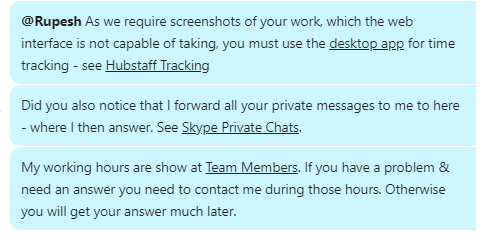
We do this on everything – we expect it to become a habit with all people working with us.
Team Communication #
The team uses several different tools when communicating with each other: You will generally work with several of these tools, when communicating with other team members, as each tool has different purposes.
See Team Communication.
Don’t use Microsoft Office applications #
NOTE: We never use Microsoft Office applications, including Word or Excel spreadsheets, in any of our team communication. Not everyone in our team has access to Microsoft Office & we’ve found using them generally results in poorer communication.
Instead we use raw test files (Notepad on Windows) & images (with suitable labelling) stored in the relevant Sync folder.
Support Ratio #
We measure & monitor the time our Team Leaders spend supporting our various teams & individual team members by doing a Support Ratio calculation.
Support Ratio = time recorded by team leader / time recorded by team or team member
The Support Ratio varies based on a team members skills, experience & time working with us.
| Role | Support Ratio |
| Experienced – Senior | < 10% |
| Intermediate – Junior | < 20% |
| Learner | 20 – 50% |
| New team member | > 100% |
A Support Ratio < 10% means other team members have do only 1 hour of work to get an individual team member to do 10 hours of productive work.
A Support Ratio > 100% means other team members spend more time working to keep a new team member working than the new team member actually spends doing productive work.
A Support Ratio > 100% is clearly unsustainable in any business so we need & look for remote contractors that move quickly from a Support Ratio > 100% to less than 20% when they join our team.
Automation #
We look for opportunities to eliminate manual repetitive tasks via automation.
If you see any possible opportunities, please:
- raise them in a relevant Skype group
- add your idea at Site Development – Automation – Tasks.
Improve #
Since I first started working on CF7 Skins in early 2013, what I’ve really been doing is learning how to create a WordPress plugin business.
Neil Murray
A WordPress plugin business has a lot of moving parts including:
- Coding/Development
- Documentation
- Support
- Promotion
As I’d already been in business many times before, some parts came easily, but others (particularly around writing code) have taken a lot of time & effort to get where we are today.
Neil Murray
Notes:
TODO
- + how we recruit – NM
- + time frame allowed – AS
- + everyone report in daily like the outback School of the Air – AS
- + input by everyone “10 brains better than 1 and 100 better than 10” – AS
- + how we work – they need to “Get It” – AS