
Last Updated on December 4, 2017 by Neil Murray
I'm looking for a better tool for documenting screenshots like this:
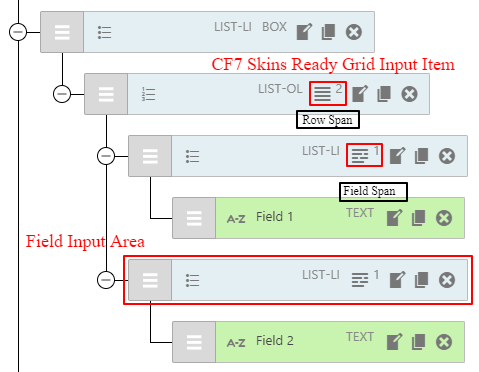
I'm currently using Awesome Screenshot via Chrome Extension but find it really cumbersome.
I'm Windows based so can't use any fancy Mac only stuff. I've also tried the following which I didn't like for various reasons:
- Skitch – very cumbersome, lack of useful features
- Photoshop – my skills to limited
- Illustrator – my skills are good but over-kill for screenshots used only in development
- Firefox Screenshots (Beta) – capture a region, save and share.
- Microsoft Paint
If you have any suggestions, please add them on this post.
You can also add a Comment if you want – you can do that on all our posts.
I use the default Sniping Tool of Windows when the screenshot is a small part of the window. Works exactly like Awesome Screenshot but is much less cumbersome!
I’m trialed Dropbox Capture (https://www.dropbox.com/features/content-collaboration/screen-capture) – I found it was a good option, but didn’t offer any advantages over the tools I was currently using.
I’m currently trialing ksnip – Screenshot and Annotation Tool (https://github.com/ksnip/ksnip) – looks like it could be a good option.
See THE Screenshot Tool, Free, Open Source for Win, Mac & Linux (https://www.youtube.com/watch?v=i0AMdQADFp4).