
Last Updated on April 17, 2022 by Neil Murray
React Sortable Tree (RST), a drag-and-drop sortable component for nested data and hierarchies, is a key feature of the CF7 Skins Visual interface.
We’ve found RST to be an excellent React library choice for CF7 Skins Visual. It provides a robust extensible package for a range of well documented use cases. RST is now developing well with ongoing support and strong community engagement.
- Refer RST Documentation for prop options
- Check out the Data Helper Functions exported from tree-data-utils.js
- Use the Drag from external source advanced example
- More examples in the RST Storybook
Understanding React Sortable Tree hierarchy #
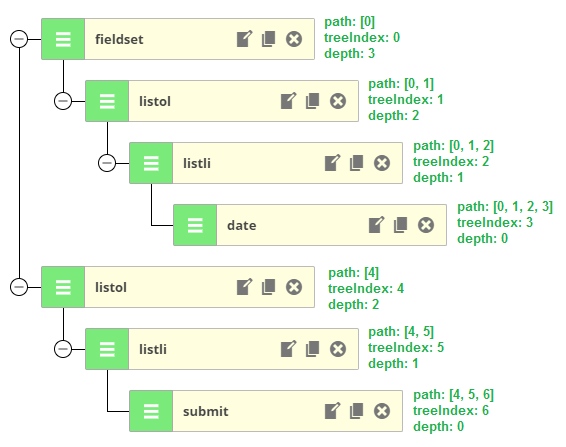
Node Object #
Each node in Visual + RST is a JavaScript object that may contain children in multi level depth and should have at least the node properties explained below.
// contains vital information such as the path of the currently edited node
// required to modify the tree structure in place with RST tree data util changeNodeAtPath
[ADD EXPLANATION – link to RST Docs]
Node Properties #
A CF7 Skins Visual node can contain RST & CF7 Skins properties.
RST Properties #
The basic RST properties used on a node are:
- node – object, current node object
- parentNode – object, parent node object
- path – array, current row path
- treeIndex – number, current row tree index
We don’t use the following RST object props in CF7 Skins Visual:
* title is the primary label for the node
* subtitle is a secondary label for the node
CF7 Skins Properties #
The basic properties used on most CF7 Skins nodes are:
- cf7sType – string, node type.
- cf7sSelectLabel – string, label for Visual form select.
- cf7sSelectGroup – string, if group is part of CF7 or CF7 Skins.
- cf7Name – string, name with dash and random number.
- cf7sLabel – string, for node list <label /> tag.
- cf7Required – boolean, if field is required or not.
- cf7TagOptions – array, contains label, description and default value for each option.
- cf7IdAttribute – string, CF7 ID attribute.
- cf7ClassAttribute – string, CF7 class attribute.
- cf7sIcon – string, uses dashicons and typcn icon.
- noChildren – boolean, node children
Refer src/visual/util/cf7sItems.js for default node properties
rowInfo Object #
[ADD EXPLANATION]
/**
 * Example rowInfo object
 *
 */

{
    node: {…},
    parentNode: {…},
        {
            type: "fieldset",
            cf7Name: "fieldset-709",
            options: Array(1),
            id: 1479227071114,
            children: Array(2), …}
    path: Array(2),
    lowerSiblingCounts: Array(2), lowerSiblingCounts: (2) [0, 1]
    treeIndex: 1,
    isSearchFocus: false,
    isSearchMatch: false
…}
RowInfo object contains:
- node – object, current node object.
- parentNode – object, parent node object.
- path – array, current row path.
- treeIndex – number, current row tree index.
Not used by CF7 Skins Visual at this stage:
- isSearchFocus – bool, for search, not used.
- isSearchMatch – bool, for search, not used.
- lowerSiblingCounts – number, total next siblings, not used.
[ADD IMAGE of inspecting the RowInfo object using Chrome Dev tools]
RST Data Helper Functions #
[ADD EXPLANATION]
changeNodeAtPath: Modify the node object at the given path.map: Perform a change on every node in the tree.walk: Visit every node in the tree in order.
Check out the Data Helper Functions exported from tree-data-utils.js
Select Area based on ‘Drag from external source’ example #
[ADD EXPLANATION]
Refer:
Styling #
RST Themes #
A themes feature has been enabled in RST – you can use the file explorer theme repo as a template for your own theme.
- React Sortable Tree – Full Node Drag Theme
- React Sortable Tree – File Explorer Theme
- A figma-inspired theme for react-sortable-tree
RST CSS Styling #
The library has been updated in v2.0.0 to not use style-loader any more, instead requiring you to import the styles yourself. This should allow you to override the styles easily yourself, by creating a modified version of the style.css file. Check it out! – Chris Fritz
Refer:
Alternatives #
- Atlaskit – Atlassian’s official UI library #
- Atlassian Tree – A React Component for displaying expandable and sortable tree hierarchies
- react-beautiful-dnd – Beautiful and accessible drag and drop for lists with React
- React Sortable HOC
- React.Rocks-react-sortable-tree – interesting way to search for React based alternatives
Helpful #
- React DnD – RST relies heavily on this for DnD functionality
- Tell me how you’re using react-sortable-tree
- A figma-inspired theme for react-sortable-tree
- Best JavaScript code snippets using react-sortable-tree
Further Reading:
Remove this line & everything below this once the above article has been approved
Notes
Get Dev. Guidelines to a point where can bring on React JS Dev to work quickly & easily in React/WordPress environment.
We need to explain how we use RST in CF7 Skins Visual, in detail, so that a new React JS Dev can start work quickly & easily on our plugins.
We need to recall what we’ve learnt since we started using RST in CF7 Skins Visual and explain this clearly & concisely.
In particular:
*