
Last Updated on February 23, 2022 by Neil Murray
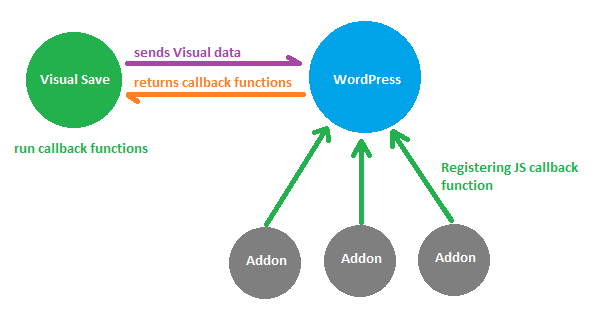
After saving Visual using AJAX post, an Add-on can update their elements to match all tags in the form or do any other changes to their interface. The update can be done by using a JavaScript callback function.
1. Registering Callback
Callback function is registered using the cf7s_visual_update_js_callbacks filter.
The filter accepts a single function as a string or function inside a namespace as an array. Take a look at this approach used in the Logic Add-on to update their elements after user saving Visual:
add_filter( 'cf7s_visual_update_js_callbacks', array( $this, 'visual_update' ) );

function visual_update( $callbacks ) {
$callbacks[] = array( 'CF7S_Logic_Admin' => 'update_logic_field' );
return $callbacks;
}
2. Apply Callback
Saving Visual will call PHP function cf7skins_visual_update() via AJAX, and the function sends back JSON output that contains all registered callbacks.
Visual later parses each callback, checks if namespace or function exists in window and then runs it.
window[addonFunction].apply();
window[addonNamespace][addonFunction].apply();