Using on_sent_ok

Introduction

Explain how CF7 users can use on_sent_ok to implement some commonly requested extra features to CF7. Cover how this is done by adding JavaScript code. Very powerful but also can cause problems.

Before you begin

Learn basic JavaScript – Codecademy

List of on_sent_ok JavaScript Tools

Collect list of commonly requested things from CF7 Support Forum.

Redirect to new page

Reset form

Google Events Tracking


From CF7 Documentation

on_sent_ok: “alert(‘sent ok’);”
on_submit: “alert(‘submit’);”
If you set on_sent_ok: followed by a one-line JavaScript code, you can tell the contact form the code that should be performed when the mail is sent successfully. Likewise, with on_submit:, you can tell the code that should be performed when the form submitted regardless of the outcome.

on_sent_ok: “location = ‘http://example.com/’;”
The simplest way is using on_sent_ok JavaScript action hook. By using this hook, you can specify a JavaScript code that you wish to run after the form is successfully submitted. You will find the Additional Settings field at the bottom of the contact form management page. It is a JavaScript hook, so it needs JavaScript to work. You’ll need another hack if you need to redirect on non-JavaScript environments.

See http://contactform7.com/additional-settings/
See http://contactform7.com/redirecting-to-another-url-after-submissions/

Other

See http://kb.cf7skins.com/javascript-conflict-problems/#on_sent_ok

Notes
Using on_sent_ok can cause problems

I have gotten cautious about the use of on_sent_ok as it easily causes problems when not used appropriately. I am not sure about how I have used it.

While on_sent_ok can cause problems when not used appropriately, it makes sense to use it for simple redirection.

The main issue with on_sent_ok is that the parameter has to be suitable JavaScript code. Many of the issues occur when people with little of no JavaScript skills use copy-pasta solutions for complex JavaScript stuff like interacting with Google Analytics.

Debugging
Short example, form:
[select menu-23 “this” “other”]
[checkbox checkbox-357 “one” “two”]

At additional settings:
on_sent_ok: “console.log( jQuery( ‘select[name=\”menu-23\”]’ ).val() ); console.log( jQuery( ‘input[name=\”checkbox-357[]\”]:checked’ ).val() );”
After sending check your browser console.

5 really useful free Contact Form 7 Extensions

While the Contact Form 7 plugin is wildly popular amongst millions of WordPress users, many people may not be aware of these really useful free Contact Form 7 Extensions.

As one on the most popular plugins in the WordPress Plugin Repository it is perhaps not surprising that WordPress Developers would be willing to spend their time developing and releasing plugins that extend Contact Form 7’s natural capabilities.

Indeed the range is such that Contact Form 7 with it’s extensions can give users many of the functions available in some of the well known premium form plugins.

The advantage in sticking with Contact Form 7 is often familiarity with the Contact Form 7 form plugin. The learning curve for some of the premium form plugins can be substantial. If you only require one or two extra features, and not the large range of extra functionality available in the premium form plugins, it can make a lot of sense to use a Contact Form 7 extension or two.

In this article, our aim is to make people aware of some very useful Contact Form 7 extensions, what they do and how they can be used to meet additional needs that WordPress users may have with their website forms.

Contact Form 7 with it’s extensions can give users many of the functions available in some of the well known premium form plugins

Really Useful Contact Form 7 Extensions

  1. Contact Form DB – Store Form Submission Data
  2. Contact Form 7 Dynamic Text Extension – Access Form Variables
  3. MailChimp for WordPress – Connect to MailChimp
  4. Contact Form 7 Honeypot – Prevent Form Spam
  5. Contact Form 7 Skins – Form Styling

1. Store Form Submission Data

Store your Contact Form 7 form submission data in the WP database

Contact Form DB

Saves submitted form data to the database and provides short codes to display it.

Using a submission storage plugin like Contact Form DB will save all your Contact Form 7 form submits to the WordPress database. These are often used by experienced WP users – they provide a robust record of all form submissions even when things go a little wrong.

The submission storage plugins are very robust and rarely fail to save a CF7 form submit even if the email is not sent due to a Javascript Conflict or other email sending problem.

+ Display data

As a bonus, Contact Form DB now works with all of the following popular WordPress form plugins:

  • JetPack Contact Form plugin
  • Fast Secure Contact Form (FSCF) plugin
  • Gravity Forms plugin
  • WR ContactForm plugin
  • Quform plugin (BETA)
  • Ninja Forms plugin (BETA)
  • Caldera Forms plugin (BETA)

So you can maintain your form submission data even if you change to another form plugin.

Further reading:

Websitehttp://cfdbplugin.com/

2. Dynamically Set Form Field Values

Add dynamic content capabilities – dynamically set the default values of your Contact Form 7 fields

Contact Form 7 Dynamic Text Extension

Allows the dynamic generation of content for a text input box via any shortcode

This extension lets you create pre-populated fields based on … (other values). Some examples might include:

Auto-filling a URL, Post ID, title, or slug
Pre-populating a Product Number
Referencing other content on the site
Populating with post or user info
Including info from custom fields

The plugin provides a dynamic text field CF7 tag type for the Contact Form 7 Plugin. It allows the dynamic generation of content for a text input box via any shortcode.

Provides a dynamic text field that accepts any shortcode to generate the content.

+ Any value you can write a shortcode for

Further reading:

WebsiteContact Form 7 – Dynamic Text Extension

3. Connect to MailChimp

Text

MailChimp for WordPress

Add MailChimp sign-up checkboxes to your Contact Form 7 forms

Further reading:

Websitehttp://cf7skins.com/

4. Prevent Form Spam

Text

Contact Form 7 Honeypot

Adds honeypot anti-spam functionality to CF7 forms.

This simple addition to the Contact Form 7 plugin adds basic honeypot anti-spam functionality to thwart spambots without the need for an ugly captcha.

The principle of a honeypot is simple — bots are stupid. While some spam is hand-delivered, the vast majority is submitted by bots scripted in a specific (wide-scope) way to submit spam to the largest number of form types. In this way they somewhat blindly fill in fields, regardless of whether the field should be filled in or not. This is how a honeypot catches the bot — it introduces an additional field in the form that if filled out will cause the form not to validate.

Further reading:

WebsiteContact Form 7 Honeypot plugin page

5. Form Styling

Text

Contact Form 7 Skins

Makes styling of Contact Form 7 forms much easier – even if you don’t have HTML + CSS skills.

Further reading:

Websitehttp://cf7skins.com/

CF7 Skins Add-ons

CF7 Skins Add-ons

Our CF7 Skins Add-ons are designed to bring the functionality available in other premium WordPress Form plugins directly within Contact Form 7.

Using CF7 Skins Add-ons can offer a number of advantages over using other premium WordPress Form plugins.

  • All CF7 Skins Add-ons operate directly within the Contact Form 7 interface – making them easy to use
  • Your existing familiarity with using Contact Form 7 – you don’t need to learn another WordPress Form plugin
  • You can still use the many plugins available that extend Contact Form 7 – both free & premium
  • Purchase only the CF7 Skins Add-ons your require – mix and match to suit your needs
  • Use of Contact Form 7 in your native language – none of the premium WordPress Form plugins have such a wide range of translations available
  • Continued access to ongoing development of Contact Form 7 – the most widely used WordPress plugin

Freemium Sales Model

The premium version CF7 Skins Pro will continue to be controlled by a license key available for purchase at Pricing.

Introducing CF7 Skins

We are pleased to announce that Contact Form 7 Skins is now available for download from the WordPress Plugin Directory. Contact Form 7 Skins is an extension for the Contact Form 7 plugin.

The Problem

Header image of the legendary Contact Form 7 plugin for WordPressAs one of the most popular WordPress plugins, Contact Form 7 has helped millions of users all over the world to add forms on their WordPress site.

While simple Contact forms are easy to create – building complex forms, and getting them to look how you want, does take some effort.

Experienced WordPress users, skilled at using HTML and CSS, are able to style their Contact Form 7 forms to their particular requirements … but this requires a level of skill beyond many people.

I decided to help solve this problem with Contact Form 7 Skins.

“It’s not that easy to get Contact From 7 forms looking like you want – particularly if you are not skilled at using both HTML and CSS.”

Our Solution

Contact Form 7 Skins works right within the normal Contact Form 7 interface, making it easier for regular WordPress users to create professional looking Contact Form 7 forms, using a range of compatible Templates and Styles.

Templates and Styles in CF7 Skins

Simply select from a list of compatible Templates that cover many common forms and then choose a Style for your form from a range of professional and beautiful Styles.

Each Template acts as an easy to follow guide, which can be adapted to your particular requirements. Every Style covers the full range of Contact Form 7 form elements.

Contact Form 7 Skins is highly customizable and easy to learn, even for beginners.

skins - features

“Contact Form 7 Skins makes styling of Contact Form 7 forms much easier – even if you don’t have HTML + CSS skills.”

Why I created Contact Form 7 Skins

I decided to start building Contact Form 7 Skins not long after I started answering questions in the Contact Form 7 Support Forum. I began doing this most days after hearing someone suggest that answering questions on a plugin you are familiar with was a simple & effective way to contribute back to WordPress.

I knew Contact Form 7 pretty well (or so I thought at the time). I also knew that the plugin author was Japanese – so I figured being a native English speaker (I’m Australian) might help.

I quickly discovered that styling of Contact Form 7 forms was a common issue in the forum. I found myself answering very similar questions day after day.

So I wrote an article on Styling Contact Form 7 Forms to provide a more comprehensive explanation of the topic than I could give in the support forum. This allowed me to answer these repeat questions much more quickly & easily and at the same time give people a more detailed answer.

Contact Form 7’s author, Takayuki Miyoshi, kindly linked to the post from the Contact Form 7 Documentation. When he did that I was immediately surprised by the number of hits. I knew that Contact Form 7 was very popular, but with the number of people reading the article each day, I finely grasped how widespread usage of Contact Form 7 really was.
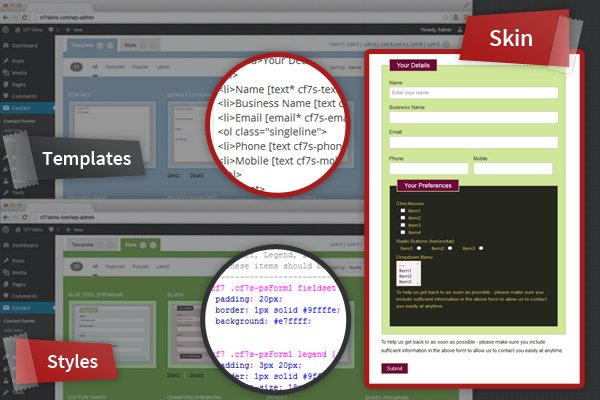
Users can simply select from a range of Templates & Styles

While the article is used by lots of people, it’s directed at people who have suitable HTML & CSS skills.

I decided I wanted to solve the problem of styling Contact Form 7 forms in a simple, practical way for regular WordPress users – that don’t have HTML & CSS skills.

The number of people reading the article each day indicated to me that there should be opportunities for a Freemium plugin that did this well.

“Contact Form 7 Skins was written to help regular WordPress users who would like to have great looking Contact Form 7 forms, but don’t have suitable HTML & CSS skills.”

CF7 Skins works within the normal Contact Form 7 plugin interface

Response to the plugin has been very positive with significant numbers of people downloading the free version of the plugin right from day one. I’m also encouraged by the number of people making the choice to purchase the Pro version each week.

Why I choose to use a Freemium Plugin Model

I really wanted to ensure that development of CF7 Skins was sustainable in the long-term. The truth is a high percentage of the plugins released each year are not maintained over time.

It’s an open secret that every Plugin Developer needs to be getting some benefit from ongoing development of the plugin (one way or the other) for development to be sustainable over the longer term.

Most WordPress users also look for plugins that are well supported and regularly updated. So it’s in everyone’s interest I think to try to come up with a sustainable business model.

In my case I made the decision that ongoing development of CF7 Skins should be made possible by sales of renewable annual licenses of our Pro Version and Add-ons.

“Ongoing development of CF7 Skins is made possible by sales of renewable annual licenses of our Pro Version and Add-ons.”

Pro Version and Add-ons

CF7 Skins Pro provides a wider range of Templates & Styles for commonly used forms plus Premium Email Support. If you are building complex Contact Form 7 forms and use your WordPress website to help make money in your business, then purchasing our Pro version can make good sense.

Our range of Add-ons aims to bring the functionality available in other premium WordPress Form plugins directly within Contact Form 7. Using a CF7 Skins Add-on can offer a number of advantages including your existing familiarity with using Contact Form 7 – you don’t need to learn another WordPress Form plugin.

CF7 Skins Multi – our premium Add-on for multi-part Contact Form 7 forms – is now available for purchase.

features-highlighted-500

CF7 Skins Multi allows you to easily break your Contact Form 7 forms into multiple steps. Forms can be divided where required, quickly & easily, right within the Contact Form 7 plugin interface.

“Now you can build multi-part forms quickly and easily, right within the Contact Form 7 interface.”

Who am I

NeilMurrayI’m Neil Murray aka buzztone in the WordPress Forums. I’m a WordPress Developer based on the Sunshine Coast in Australia.

Feel free to contact me if you have any questions.

NOTES:

The free version has identical functionality, just a smaller range of Templates & Styles. It’s a completely viable option for many Contact Form 7 users. Ideal for those who would just like an attractive Contact form. We welcome people using the free version. We understand that a widely popular free plugin is the first step to having a successful Freemium plugin.

But if you are building more complex Contact Form 7 forms and you use your WordPress website to help make more money in your business then our Pro version and CF7 Skins Add-on or two can make good sense.

> Premium Email Support

“Contact Form 7 Skins helps you create beautiful forms without writing any HTML or CSS code.”

CF7 Skins Beta Release Announcement

We are glad to announce the availability of CF7 Skins for beta testing. We have put a lot of work into it and we need your help to make it even better for the final launch.

What is CF7 Skins?

Header image of the legendary Contact Form 7 plugin for WordPressAs one of the most popular WordPress plugins, Contact Form 7 has helped millions of users all over the world to add forms into their WordPress site. It comes with built in capability to use templates and custom styling, but most WordPress users have little or no knowledge of how to do that.

We decided to help solve this problem with CF7 Skins.

CF7 Skins provides you beautiful skins and ready to use templates for your forms. Instead of choosing tags and writing HTML to create complex forms, simply choose a template from several available choices and apply a professional designed CSS style to your form.

Templates and Styles in CF7 Skins

CF7 Skins helps you create beautiful forms without writing any HTML or CSS code.

Ready to try CF7 Skins?

Want to try out CF7 Skins in its beta stage? Simply visit our beta testing page and sign up. We’ll send you download details and all the information you need to get started. After that you can simply install and activate CF7 Skins and have fun with it.

Following completion of Beta Testing it’s planned the free version of CF7 Skins will be made available for download from the WordPress Plugin Directory. The premium version CF7 Skins Pro will continue to be controlled by a license key available for purchase at Pricing.

What are our expectations of Beta Testing participants?

As beta testers you will be helping us make CF7 Skins ready for public release. We would like you to create different kind of forms using CF7 Skins templates and styles. Preview your forms and see if everything is working fine.

After testing it for a while, you can send us your feedback. We need information from you like how you used it, what you liked or disliked about it.

Found a Bug?

If you come across any issues during beta testing, then please report them here. We may need more information from you like your setup to solve the issue. We may also need you to apply fixes to the issue and report back.

Please note, that even though the plugin is usable, secure, and well coded, it is still not ready to be used on mission critical live sites. Please test it only on your staging, development, or local environments.

With your help, we are hoping to locate and squash any major bugs before final release. Click here to sign up as a beta tester.

Quotes

Offer some form of solution in each reply – August 20, 2015

Even if you need to ask your customers for more information to diagnose the problem, at least attempt to offer some form of solution at every opportunity – even if it’s just a case of eliminating the most common problems from the list.

When you do this, you give yourself the opportunity to resolve every ticket at the first time of asking.

Become Great at Managing Feedback – December, 2014

Research shows that for every customer that bothers to complain, another 26 customers have the same problem, yet remain silent.1 Any and all feedback from customers is gold. Even a single complaint is worth putting through whatever system you have for collecting, organizing and processing feedback.

Give Your Employees an Identity Worthy of Ownership – December, 2014

We start to see the real merit in the ways companies like Buffer refer to their support team as “Happiness Heroes.” It’s not to create distance between the traditional service rep title; it’s a clear-cut way to show how the company values support and what they expect this department to achieve (not placating customers, but truly making them happy). It is more meaningful for employees to “make people happy” than it is to “provide customer service.” The objective directly affects motivation.

Tim Carr – A Guide to Providing Quality Customer Support – April, 2014

I looked at other ways to engage with the customer after their purchase. One great way of doing this is to add them to a mailing list upon their purchase, and setup an auto-responder follow up email 24 or 48 hours after their purchase.

Hi,
Tim from WP Cube here. Just wanted to follow up on your recent plugin purchase to see how you’re getting on.
If you have any questions, need help, happy with your purchase (or not!), do reply to this email and I’ll be happy to help out. I’m keen to hear all feedback, good or bad.
Thanks,
Tim,
WP Cube

Pippin Williamson – Getting good at support – October 15, 2013

Conflict with your theme or another plugin are an unfortunate fact of life in the WordPress eco-system.

I’m sorry to hear that you are having trouble, but we are more than happy to help you work through all of issues you are experiencing. Typically this kind of problem comes from a simple conflict with your theme or another plugin. With just a little information from you, we should be able to diagnose the issue and track down the source of the problem.

Get used to stepping back, putting myself in their shoes, replying kindly, and finding a solution no matter how long it takes.

Most people are one curly bracket or disabled plugin away from remedying the issue.

Ian Dunn – Support Expectations for Meta Plugins in the WordPress.org Repository – September 17, 2013

Since we have a lot of things we want to accomplish, and a limited set of resources, my opinion is that we should provide product support, but not user support. i.e., we should fix bugs and security vulnerabilities, but not help people who are having trouble using the plugin, or who want to customize it to fit their specific needs.

Support Expectations:
We created this plugin to scratch our own itch, and are happy to offer the code to the community in the spirit of open source. We are only able to provide limited support, however. If you find a legitimate bug or security vulnerability∗, please let us know; we take those seriously and will fix them.
On the other hand, if you’re just having trouble using the plugin, or making it fit your specific needs, then you’ll need to solve the problem yourself, hire a developer, or get help from the community.
∗ If you do find a security issue, please disclose it to us privately by sending an e-mail to security@wordpress.org, so that we can release a fix for it before you publish your findings.

Help Scout

Help Scout

https://secure.helpscout.net/

CF7 Support

Email Address: cf7support@cf7skins.com
Forwarding cf7support@cf7skins.com to support.17358.8fe698f6fc9a63cc@helpscout.net

CF7 Skins Support

Email Address: help@cf7skins.com
Forwarding help@cf7skins.com to support.6769.37aad02f81e16675@helpscout.net