
Last Updated on April 13, 2025 by Neil Murray
Our New AI Website Builder – Apr, 2025 #
Creating a website should be simple. And now it’s as simple as having a conversation.
That’s the magic of our new AI website builder. It takes your input and instantly creates a fully designed, content-ready WordPress website, complete with text, layouts, and images, for you. Just you and your vision, with AI handling the rest.
It’s still WordPress: If you want to take over, you can edit and add pages manually, change the site design, and use development tools on our Business plan and above.
You need a website, not a new skill set. Instead of figuring out how to build a website from scratch, you can have a full-blown WordPress site that looks great and works seamlessly without the manual effort.
Refer:
Better WYSIWYG for content creators – Mar, 2025 #
Gutenberg is the first editor that makes WYSIWYG possible in native WordPress. Yes, it’s still rough around the edges, but that’s to be expected. This is a ground-up re-imagining of the web WYSIWYG and that’s a huge task.
I know the pain of a content creator through all these generations of the web and we still haven’t solved the WYSIWYG idea that people know from Desktop Publishing, MS Word, or Adobe Insights.
The proliferation of page builders for WordPress illustrated the need. Their implementation, however, is clunky and hazardous. Despite WordPress being an open system, most page builders and Themes lock you in.
You might as well use Squarespace and Wix, get better support, and surrender to the fact that you have to rebuild your site from scratch if and when you want to leave those systems.
Birgit Pauli-Haack – Gutenberg Times
Making Product Onboarding and Product Tours Extensible – Mar, 2024 #
This update is going to help people who are new to WooCommerce by making it easier for them to learn how to use it. Now, people who make websites can change the guides and instructions to better fit what their customers need. This makes it simpler for new users to get started and for developers to guide them through WooCommerce.
I see these changes that are coming to WooCoomerce via the Gutenberg Editor as eventually making WordPress Ecommerce much more accessible to WordPress DIYers. As this happens WooCoomerce should increasingly dominate over Shopify in this market.
Neim Murray 24-03-2024
Gutenberg 16.9 Adds Experimental Form and Input Blocks – Nov, 2023 #
I’m so pleased to see the Gutenberg Team is tackling creating a Form API for WordPress core.
Forms are an essential part of nearly every WordPress site, yet this key web component has previously been left to plugins to deliver.
The result is large range of WordPress form plugins, both free & premium, (including some of the biggest plugins on WordPress) with little consistency & no cross-compatability.
WordPress form users need to learn the unique approach to form creation taken by each form plugin. If they switch form plugins, their previous form work is lost & they need to learn it all again.
I see the Form API as an opportunity to bring forms directly within the Block Editor in a way that is properly accessible & also extendable by the current crop of WordPress form plugins.
Neil Murray – wptavern.com – comment
Skype Chat 2023-11-10 – Nov, 2023 #
Sastra:
all Neil It seems the Gravity Form member carlhancock (perhaps any external form plugin developer) feels a bit disappointed with the PR being included to Gutenberg experimental without any notice and discussion previously. If this block added in Gutenberg like he said, could be millions of forms user will move into this block.
I like to know your thoughts about this?
Neil:
I think he is behaving very badly & his comments are inappropriate.
Gravity Forms is the oldest & biggest (premium only) form plugin on WordPress & I think he feels WordPress should not change in any way that damages his income.
As far as I know Gravity Forms does not contribute in any way to WordPress other than being a paid sponsor at WordCamps.
I also haven’t seen any evidence of Gravity Forms doing Five for the Future.
The smarter option, which I hope we can follow, is to get involved on this issue & help where we can.
Indie Hackers #276 SaaS Trends – Apr, 2023 #
One thing I really regret is I didn’t delegate more – that I didn’t hire more senior people. I hired a lot junior people because I didn’t have money & I was always the bottleneck – managing junior people.
One thing that’s on my mind these days is the luxury I have .. because we have very senior people. So the moment you can, hire someone who’s really good, even if they’re expensive & that will allow you to 10X.
Rob Walling of TinySeed
Get Early Access to Full Site Editing – Jan, 2022 #
Some highlights of Full Site Editing include:
- Point and click edits in all parts of your site, including headers, footers, and sidebars!
- Drag and drop blocks to design beautiful and complex navigation menu bars.
- Edit items like your header, page content, and footer all in one place. You’ll no longer need to jump out of your page editor to make changes in the Customizer! Everything is available to edit right where you already are.
- Use all the power of blocks, reusable blocks, and pre-designed block patterns to design every part of your site.
I think new WordPress users are going to expect forms to be done directly on any page or post.
Neil Murray 18-01-2022
Form plugins that do this early will see greater usage & popularity – older form plugins that don’t, will see declining usage.
CF7 Skins will have an opportunity to provide that option for the millions of CF7 users. This is a big, complex & challenging task that Takayuki is unlikely to tackleany time soon.
4 years from Page & Post Content Editor to Full Site Editor.
- Jan 2022: Gutenberg – Full site Editor – WP 5.9
- Dec 2018: Gutenberg – Page & Post Content Editor – WP 5.0
The WordPress form plugins ecosystem will change dramatically in the next 3 to 5 years, driven by the widespread adoption of Full Site Editing (FSE) within WordPress.
Neil Murray 19-01-2022
Plugins at the top of the ecosystem will drop down towards the bottom, if they don’t change to work the way new WP users (who’ve only ever used FSE) expect all WP blocks to work; a WP Form will be just another block to them.
Frontity – Documentation Objectives – Jan, 2020
- Engage, provide support, and build relationships with developers to encourage them to use Frontity as well as actively help them succeed with it.
- Identify developers’ needs and pains and how they use the framework to define what type of guides, documentation or features are still missing.
- Investigate and design how our documentation is going to be organized to make it as effective and simple to understand as possible.
- Create inspiring demos, guides, and tutorials about Frontity.
- Help build an inclusive and supportive environment within our community forum and social media platforms.
- Effectively communicate all the user feedback received to the Frontity team to help define the go-to-market plan and improve our product and marketing strategies.
- Participate actively in the prioritization of both the product and content roadmap, adding input on how each feature/piece of content might impact each user-persona.
WHAT’S NEW IN GUTENBERG? – Jan, 2020
It includes a new Buttons block to align more than one button in a row. Several block plugins had this block available already and now it made its way into Gutenberg Core.

Why I’m betting on Gutenberg – Jan, 2020
The missing element in WordPress which was already discovered by the market (themes like Avada) is an easy way to build, customize and arrange elements (blocks) required to build a website. This was solved with the help of page builders plugins and they’re doing a great job at solving this problem.
However, Gutenberg is working towards filling this gap natively. WordPress is moving away from being only a text editor to a content editor. The idea of blocks in the content editor and the blocks directory will provide users, especially first-time users a seamless experience of building websites.
I do think with the completion of Gutenberg Phase 2 it will be able to compete with the page builder plugins. So, I do think it will give page builders very tough competition in the future.
Almost every WordPress plugin and theme is already trying best to integrate nicely with Gutenberg which many did not even think of doing for a particular page builder plugin. For example, WooCommerce has Gutenberg blocks, Yoast SEO has Gutenberg integration, EDD has Gutenberg blocks, most of the popular WordPress plugins adding Gutenberg integration the best they can. This was not done for any other page builder yet?
It will grow much massively faster than any page builder plugin because of the 3rd party developers. Developers like you are already embracing Gutenberg with add-on plugins and this will only get better and better in the near future.
Blocks, templates, and styles: architecture for a Gutenberg world – Feb, 2019

“..templates can contain “starter content” — editorial boilerplate text and media so that a user can simply tweak and replace rather than having to start from scratch.”
I was struck by how similar this to our current descriptions of CF7 Skins Templates:
“Each Template acts as an easy to follow guide, which can be adapted to your particular requirements ..”
“Our Templates cover a range of commonly used forms – like User Suggestion, Customer Survey, Event Registration etc.”
“The Template acts as a starting point for your form content and layout. It includes the necessary HTML and Contact Form 7 Tags required to both structure and style your Contact Form 7 form.”
From Site building study results – Feb, 2019
Key findings
Technological change presents cognitive challenges.
Most users want to get a site up as quickly as possible so they can focus on their core interests.
The way WordPress’ theming system work doesn’t match the way people think about building a site.
People don’t have pre-defined visions of what a site should look like.
Recommendations
Split themes into “styles” and “templates”.
Provide different paths for power users and for beginners.
Be very intentional with how changes are rolled out.
Allow for building by experimentation and play.
Documentation and help should be baked into the product.
Adopt a more data-informed approach to the introduction of new features.
Avoid adding features that aren’t integral to the core experience.
Clearly communicate future product vision and roadmap.
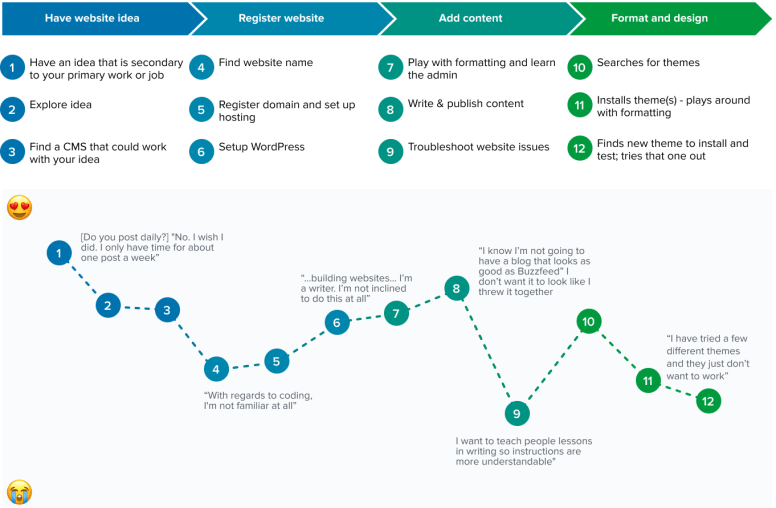
bloggers
Their site represents a hobby, and they don’t have enough time to cultivate it fully.
Moving beyond to a professional level presents a significant barrier to entry.
Available themes aren’t a perfect match for their content needs.
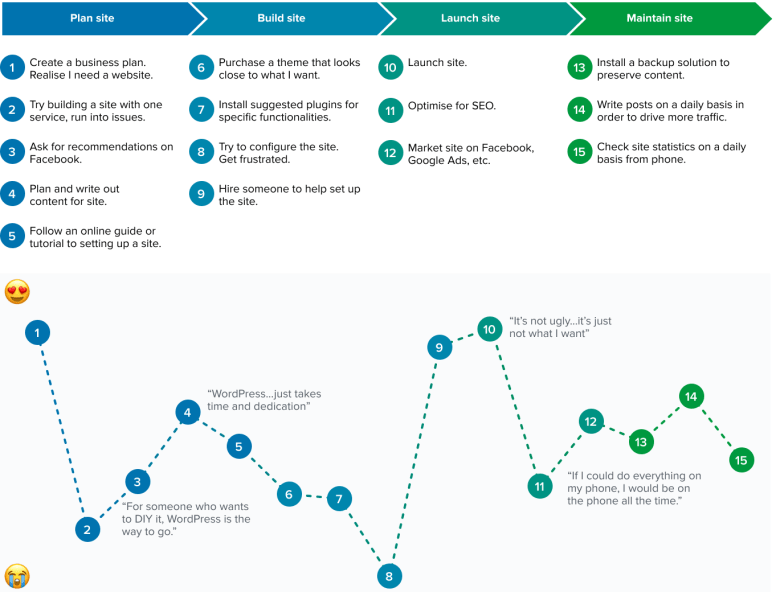
small businesses
Decrease jargon in user interfaces.
Simplify interfaces as much as possible, and reveal complexity progressively.
Provide extension packages or plugin recommendations tailored to specific use cases.
Connect businesses with service providers directly so that they can delegate tasks more efficiently.
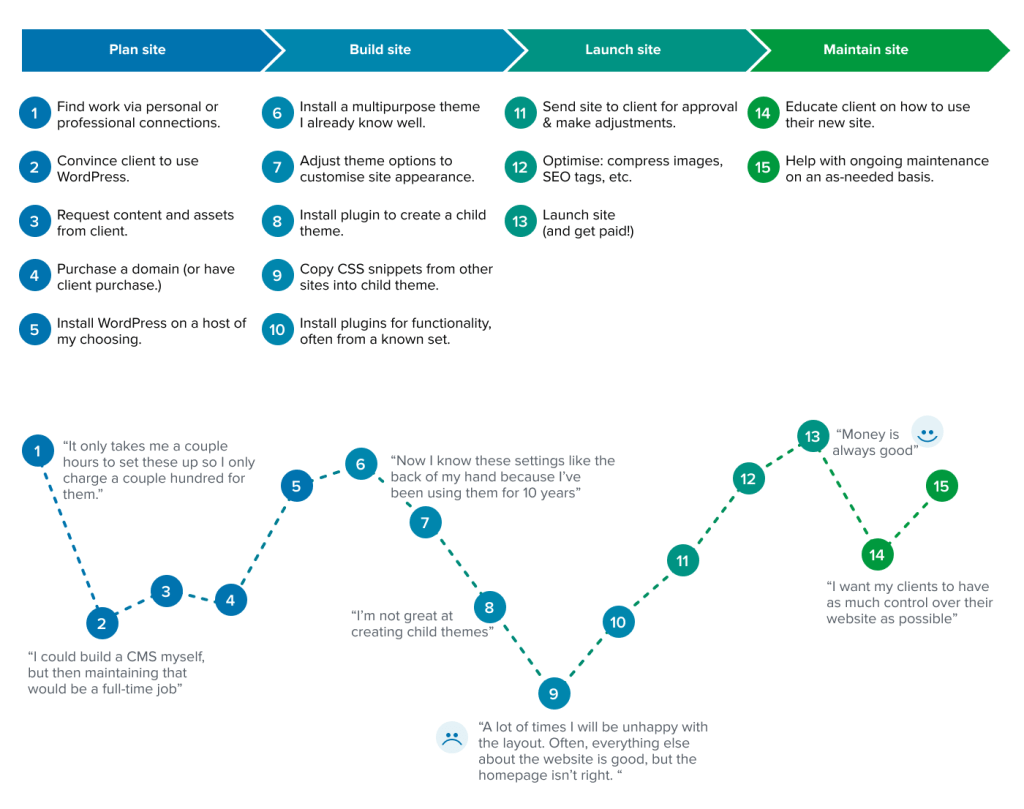
site builders
Help site builders sell their clients on the value of WordPress.
When introducing core changes, communicate the value of learning a new paradigm.
Separate themes into visual styles and templates for increased flexibility and customisability.
Implement reusable snippets that can be reused across sites.
Provide shareable resources to educate & sell clients on WordPress.
Upgrades should be controllable and reversible.
Summary
Site Building
A website is a tool for achieving a goal, not an end in and of itself. Building a site is often a necessary distraction from that goal.
People don’t care about the process of building a site—they just want to build something that works as quickly as possible, so they can focus on their core interests.
People have defined structures for how they build WordPress sites—they learn one approach, and then they repeat that for other sites.
Often this means investing in learning one complex “do everything” theme and using that across all their sites.
Themes
The term “theme” doesn’t really mean anything to people. A lot of people use the term “template” when they mean “theme.”
A lot of people spend a great deal of time choosing a theme, and they’re often unhappy with what they land on. often unhappy with what they land on.
Solving Problems
Casual bloggers and people who may not consider themselves technical experts search Google to find answers to their questions.
They assume documentation will solve their issues and are willing to learn more so they can make their website better.
Purchases
People will delegate as much work as they can afford to, so they can focus on the core of their work.
Often a website is one of the first things they’ll delegate.
People rely heavily on referrals and reviews for advice when choosing software to use, whether that’s in person or via Facebook groups.
UI
WordPress uses too much jargon.
Generally speaking, people prefer when there’s a direct connection between element controls and the element itself.
Change
Big changes in software present cognitive challenges, particularly to long-term users of a product.
Technology moves too quickly for people to keep up with unless they’re directly involved in the tech industry.
People need to be sold the value of learning something new, because they see it as an investment that needs to be worth their (often limited) time.
More technical users have very entrenched ways of doing things and just want to get on with it, but beginners prefer more hand-holding.
Provide more gradual transition paths, make it easier to roll back to prior versions or “undo” an upgrade.
Fred Meyer – This Changes Everything: Gutenberg is Good Now – Dec, 2017
Once the WordPress community is unified around a layout builder that works in Blocks, themes should do three things:
* Make attractive default choices outside the content area: header, footer, navigation.
* Offer a basic default visual language: widths, colors, typography.
* Offer custom “skins” for Blocks—both Gutenberg’s core blocks and plugin-based Block extensions—that integrate with the theme’s overall visual language.
This is what Squarespace templates do, and the user experience is immensely better for it. A Squarespace template is basically some default colors and fonts, a menu layout, a max-width on the content area—and a default way that Squarespace’s standard blocks, like its contact form, appear when dragged onto the front-end.
From Developing a Customer Service Tone Guide – Nov, 2017
Our on-boarding process was a major part of maintaining and actively improving culture while growing our team. We’ve found that having a lot of team documentation and knowledge-sharing has helped us keep both existing team members and new additions on the same page, so we ensure everything is written down somewhere.
From an interview with the Release Leads of WordPress 4.9 – Nov, 2017
This is somewhat where the REST API comes into play and the move toward JS-driven interfaces: we have an opportunity to do a reboot of sorts with a new foundation upon which we can build the next generation of WordPress, while we still maintain the old foundation for existing themes and plugins –
Weston Ruter
From article on the new Apple campus – Nov, 2017
When I look back over the last 25 years, in some ways what seems most precious is not what we have made but how we have made it and what we have learned as a consequence of that. I always think that there are two products at the end of a programme; there is the physical product or the service, the thing that you have managed to make, and then there is all that you have learned. The power of what you have learned enables you to do the next thing and it enables you to do the next thing better. — Jony Ive
Gutenberg Editor will fundamentally change all development in WordPress – July, 2017
Gutenberg Editor is at the heart of the future of WordPress. The way Gutenberg interacts with things like the Media Library, WP Rest API & the Customizer will become the foundation of how WordPress works 5 – 10 years from now.
This will fundamentally change the way themes & plugins interact with WordPress, from a situation where PHP dominates, to a new mode where both JavaScript & PHP cooperate in that interaction. – Neil Murray
Reflection on a price increase – Mar, 2017
The post is mosty interesting in that it shows clearly how not to do a price increase, but the comments are well worth reading to get some insights about how people think about freemium plugins.
From comment on Editor Technical Overview – Jan, 2017
They should all re-use the same underlying block API which is a thing that has a set of attributes, a UI for managing them, and a method for rendering them onto a template.
Weston Ruter – Editor Technical Overview
The instance data is stored as shortcode attributes, though the instance data could be stored as data-* attributes, inside of HTML comments, in HTML5 Microdata, and so on.
Weston Ruter – Editor Technical Overview
Contact Form 7 Review: The Best Free Contact Form Plugin For WordPress? – Nov, 2016
Unlike some of the other popular free and premium form plugins, you don’t get a live preview of your form. Neither is there a drag-and-drop form builder interface to simplify the process of creating your forms. Instead, your form creation work takes place through a slightly un-user-friendly interface.
Compared to the most expensive and powerful WordPress multi-purpose form plugins like Gravity Forms, Contact Form 7 might be lacking in form fields. However, for creating basic online forms, it should have all the fields most users will need.
As you won’t find the advanced form fields you’ll get with commercial options like Gravity Forms, if you need to create forms that use conditional logic to determine which fields to display based on a user’s selections, or accept payments and include auto-calculating fields, you’ll need to upgrade to a premium forms plugin like Gravity Forms or Ninja Forms.
One of the advantages of choosing a commercial plugin over a free option is often the promise of responsive user support.
If you just want a quick and easy way to add a contact form to your WordPress website, Contact Form 7 is hard to beat. However, it’s not a perfect solution and does have some drawbacks.
1. One area where Contact Form 7 falls behind the completion is its form builder interface. Unlike WPForms and some other free and commercial form plugins, there’s no drag-and-drop form builder tool.
As we covered earlier, the process for adding additional fields to your forms is a little protracted. Creating custom forms isn’t too complicated, but a drag-and-drop form builder with a preview window would improve things considerably.
2. There’s also no quick way to change the appearance and styling of your forms.
3. A minor complaint is that Contact Form 7 doesn’t add a button to the WordPress Editor that gives you an easy way to insert forms into your content. Instead, you must copy and paste the form shortcode into your content. This isn’t a deal breaker, but again, being able to insert forms into your posts and pages from the WordPress Editor would improve the user experience.
There’s also no commercial or premium version of Contact Form 7.
In one way, this is good. There are no upsells or disabled features.
On the other hand however, there’s also no option of upgrading as your requirements grow, whether you need access to more powerful features or more responsive support.
The Best Contact Form Plugin – Feb, 2016
I use Contact Form 7 since the first time I use WordPress. It’s easily the best and easiest to use compared to other contact form plugin. I got side-tracked with Jetpack Contact Form module and Gravity Form (Commercial). But both always have problems. Too simple, or too complex.
But I always back to Contact Form 7. This plugin is coded well, and very extendable. Good for regular user and developer too.
You’ve really elevated CF7 to a new level – November, 2015
On 23 November 2015 at 00:36, Slade Grove <slade.grove@gmail.com> wrote:
You’ve really elevated CF7 to a new level.</slade.grove@gmail.com>
Not all it’s cracked up to be – March, 2015
I installed this plugin because it got very high ratings. Boy was I disappointed.
My biggest complaint about this plugin is that once you created a field, there’s no way to edit it. You have to create it again and with your minor corrections.
It looks robust at first, but the end user is left with a lot of experimentation to figure it out. And no, the documentation did not help. I found it basically useless.
With all the drag and drop functionality that’s out there, this plugin seems a little archaic.
Sorry to be so negative, but I really don’t understand why this got such high ratings.
Novice WordPress user – January, 2015
UGH. I didn’t want to have to do this.
I doesn’t seem as easy as I thought it would be.
Give Your Employees an Identity Worthy of Ownership – December, 2014
We start to see the real merit in the ways companies like Buffer refer to their support team as “Happiness Heroes.” It’s not to create distance between the traditional service rep title; it’s a clear-cut way to show how the company values support and what they expect this department to achieve (not placating customers, but truly making them happy). It is more meaningful for employees to “make people happy” than it is to “provide customer service.” The objective directly affects motivation.
Employees desire to have a sense of purpose and to know that their actions are contributing in a meaningful way.
On Coaching and the Performance Culture – August, 2014
I’ve argued before that no entrepreneur or manager has the obligation to be a therapist — people can change, but your responsibility is in teaching and developing your best employees, not in coddling your worst.
The Future of WordPress – June, 2014
If you can create a business model around something WordPress users need, your chances of success are high.
Good plugin – June, 2014
Contact Form 7 – This is a good contact form plugin, simple but extensible. The only drawback with this one is the clunky way to add/edit fields, non-technical users might find it not intuitive.
Exploring The Best Contact Form Plugins For WordPress – June, 2014
This plugin, while not being hard to learn, does require minimal knowledge of HTML and other code. If you’d like to create more fields, it’s quite a bit of work to both create those fields and make sure the form sends all its information to the right place.
CF7 – All you ever need – June, 2014
Been using CF7 for years and in many sites. It might not have a fancy, visual drag and drop interface, but if you take time to get used to it, you can get even the most complicated form done.
Add CF7 Visual Form Editor & Styler as premium extension to CF7 which provides visual interface on top of CF7 and CF7 Skins
What Form Builder plugin would you recommend for WordPress? And, why? Thanks! – June, 2014
With some PHP, you can extend CF7 with dynamically-populated custom fields (e.g., dropdown menu of current job positions available), swap out the recipients email address after submission (useful for a one-form-fits-all forum/ private message system), add hidden fields (referral page, URL of the page the form is on, date/time, etc), and probably a whole lot more that I haven’t encountered yet.
wptavern.com – Why WordPress Theme Developers Are Moving Functionality Into Plugins – April 14, 2014
When it comes to theme options, the cold, hard truth is that not everyone is a designer. There is no ultimate visual layout builder or unlimited color chooser that will magically make you into a designer.
If this is something you can recognize about yourself, then you may want to steer away from themes that offer massive options panels with unlimited everything. Instead, opt for design-specific themes that follow best practices and offer a few options using WordPress’ native customizer.
Tim Carr – April, 2014
I looked at other ways to engage with the customer after their purchase. One great way of doing this is to add them to a mailing list upon their purchase, and setup an auto-responder follow up email 24 or 48 hours after their purchase.
Hi,
Tim from WP Cube here. Just wanted to follow up on your recent plugin purchase to see how you’re getting on.
If you have any questions, need help, happy with your purchase (or not!), do reply to this email and I’ll be happy to help out. I’m keen to hear all feedback, good or bad.
Thanks,
Tim,
WP Cube
A Guide to Providing Quality Customer Support
Syed Balkhi – February 27, 2014
Theme companies with integration is definitely the future. I like what Astoundify is doing with EDD. I like themes that comes with Gravity Forms styling and WooCommerce styling etc.
Passing by reference to Method of Class – January 18, 2014
I know from other articles that when you reference a method of a class in PHP you need to pass it as an array with the first item being the class and the second the method, however I notice that you have prefixed the class with an ampersand (ie &$this), I believe this is passing by reference, would you be able to explain simply why this is necessary and how it works as I’m a bit hazy on the whole passing by reference concept.
My passing by reference is a carry over form some of the C programming I used to do. From a memory standpoint, you aren’t copying the value into another location in memory and then editing it just to pass it back.
MailPoet – 3 ways to install a plugin – December 27, 2013
There are 3 ways to install this plugin:
1. The super easy way
In your Admin, go to menu Plugins > Add
Search for mailpoet
Click to install
Activate the plugin
A new menu mailpoet will appear in your Admin
2. The easy way
Download the plugin (.zip file) on the right column of this page
In your Admin, go to menu Plugins > Add
Select the tab “Upload”
Upload the .zip file you just downloaded
Activate the plugin
A new menu MailPoet will appear in your Admin
3. The old and reliable way (FTP)
Upload wysija-newsletters folder to the /wp-content/plugins/ directory
Activate the plugin through the ‘Plugins’ menu in WordPress
A new menu MailPoet will appear in your Admin
http://wordpress.org/plugins/wysija-newsletters/installation/
Jesse Pearson – WordPress and Programming Languages – December 27, 2013
HTML is the structure of the page. Learning it will allow you to move, add, remove or edit items in themes. An example could be if your navigation bar was above your logo at the top of the page, but you wanted to move it below the logo, you snip the code and paste it below.
CSS is what skins the page, it allows you to manipulate colors, to background images, to gradients. If text was blue, you could change it to red.
Cloudup Which browsers are supported? – November 15, 2013
Recommended browsers:
Google Chrome (25.0 or higher)
Apple Safari (6.0 or higher)
Mozilla Firefox (19.0 or higher)
We also currently support:
Opera (12 or higher)
Internet Explorer (10 or higher)
Cloudup is not fully supported on the following browsers yet:
Older versions of Chrome, Safari, Firefox, Internet Explorer and Opera
Benjamin Beck – Local Stampede (3 Min Survey) How Much Time Do You Spend Training On WordPress? – November 15, 2013
Hi WordPress Experts! I worked at an agency that spent WAY too much time training clients on how to use WordPress.
I’m working to fix that, but I need your help. Please fill out the survey so I can create the best possible product for web designers!
Pippin Williamson – Getting good at support – October 15, 2013
I’m sorry to hear that you are having trouble, but we are more than happy to help you work through all of issues you are experiencing. Typically this kind of problem comes from a simple conflict with your theme or another plugin. With just a little information from you, we should be able to diagnose the issue and track down the source of the problem.
Get used to stepping back, putting myself in their shoes, replying kindly, and finding a solution no matter how long it takes.
Most people are one curly bracket or disabled plugin away from remedying the issue.
Steven Gliebe – WordPress theme and plugin pricing: “Unlimited” sites is unsustainable too – August 12, 2013
Why should the customer with one site be covering the costs of the user with 10 sites? That is effectively what is happening right now. Prices should be lower for single site users and higher for multi-site users. And there should simply not be an “unlimited” option.
Joost de Valk – The honest Truth about Plugin Testing – September 30, 2013
A word on versioning
I thought it’d be wise to add a note to this post on our versioning system. We try to stick with Semantic Versioning, which means that upgrading from 1.4.17 to 1.4.18 for instance should be painless as the upgrade only contains bug fixes. We have in the past made the mistake of adding functionality in a minor release, we won’t do that again. Those minor releases are for bug fixes, new features will be marked by upgrading from 1.4 to 1.5, like the upcoming release.
When we go to 2.0, which we are planning for, we will drop some (though only a small part) of our old API, so at that point we increase the major version number.
Devesh Sharma – 7 Best Contact Form Plugins for WordPress – September 18, 2013
Contact Form 7
Cons: Technically, this plugin doesn’t lack anything but it would be nice to have a few templates to choose from. If you want to modify the design, you would need to play with the CSS.
Neil Murray – Contact Form 7 Datepicker support – September 2013
Contact Form 7 has some Datepicker support via the new HTML5 date input type (see http://contactform7.com/date-field/) but this is currently only supported on some browsers – see http://www.wufoo.com/html5/types/4-date.html
It would IMHO be unwise to add tighter integration with the jquery date picker directly in CF7 (at least at this stage), though users could certainly consider using the jquery date picker via a separate plugin.
In fact I would recommend against adding any more Javascript to the CF7 plugin at this stage.
Javascript Conflicts are a big deal. There are so many poorly written themes and plugins that cause Javascript conflicts with well written plugins like CF7.
A large number of the issues in the CF7 forum relate to Javascript conflicts. Many CF7 users have little or no Javascript experience and wrongly blame CF7 for their particular Javascript conflict problem.
Neil Murray – Looking for a plug-in that will allow me to create online forms that look good – September 20, 2013
IMHO your looking the wrong place. While some of the premium Form plugins (like Gravity Forms & Visual Form Builder Pro) do assist with the appearance of forms, the look is typically much more dependent on CSS styling applied to standard HTML form elements within your current WordPress theme.
In your case, grabbing a Developer to assist with some styling changes in your current theme, could be a whole lot easier than you learning how use a premium Form plugin to get the sort of appearance you want in your forms.
Ian Dunn – Support Expectations for Meta Plugins in the WordPress.org Repository – September 17, 2013
Since we have a lot of things we want to accomplish, and a limited set of resources, my opinion is that we should provide product support, but not user support. i.e., we should fix bugs and security vulnerabilities, but not help people who are having trouble using the plugin, or who want to customize it to fit their specific needs.
Support Expectations:
We created this plugin to scratch our own itch, and are happy to offer the code to the community in the spirit of open source. We are only able to provide limited support, however. If you find a legitimate bug or security vulnerability∗, please let us know; we take those seriously and will fix them.
On the other hand, if you’re just having trouble using the plugin, or making it fit your specific needs, then you’ll need to solve the problem yourself, hire a developer, or get help from the community.
∗ If you do find a security issue, please disclose it to us privately by sending an e-mail to security@wordpress.org, so that we can release a fix for it before you publish your findings.
Lucy Beer – Bridging The Gap Between Developers and Users – September 6, 2013
Try to think like a user instead of a coder. I’ve seen many themes claim to be “easily customized” and what they really meant was “easily customized with CSS.” While CSS is easy for developers, this is not what users consider “easy.” They don’t want to touch CSS, FTP or pretty much anything outside of the WordPress admin.
Justin Tadlock – Whistles WordPress Plugin – September 9, 2013
Because I know this will most likely be necessary, let me just add this note. This plugin might not look that good with your theme. It’s next to impossible for a plugin such as this to look good with all themes or even most themes. It really needs custom style rules based on the design that you’re using. With that said, it should look decent in the current default WordPress themes.
Matt Cohen – Sustainable Value in WordPress Products – September 4, 2013
If you have a plugin that, for example, stores and displays testimonials from your customers, does this plugin need to provide an advanced GUI for customizing the HTML markup of each testimonial? No, it doesn’t.
Not all customers will want to use this, so it could become dead code, sitting on the server doing nothing. This is commonly referred to as “code bloat.”
Each plugin should have a singular purpose and do that job amazingly.
Value is not what the customer could potentially do with your product, it’s what they want to do with it (i.e. their needs).
Neil Murray – Making forms responsive on a WordPress website – August 28, 2013
Making forms responsive on a WordPress website is usually dependent on both the Form Plugin used and the WordPress theme selected. Not sure how Gravity Forms styles for responsiveness, but Contact Form 7 (CF7) contains neglible CSS styling itself. That way all standard HTML form elements supported by CF7 are styled largely by the selected WordPress theme. If you select a WordPress theme that includes responsive styles for all the standard HTML form elements (it’s a key thing I look for in themes we use) you should have little difficulty making responsive CF7 forms for your clients.
You will need to check that the theme includes responsive styles for all the standard HTML form elements supported by CF7.
A lot of “Responsive” themes forget to handle the standard HTML form elements.
David Gottman – Making forms responsive on a WordPress website – August 28, 2013
Most responsive themes are based upon a responsive css framework like Bootstrap, Foundation and many others. I mainly build upon Bootstrap based themes which makes creating responsive form input elements relatively easy – http://getbootstrap.com/2.3.2/base-css.html#forms.
Erick Danzer – Open Letter to the NextGEN Community from Erick Danzer – August 14, 2013
We’ve released a NextGEN Pro upgrade as well. The Pro version doesn’t replace or take anything away from the free version. It’s an add-on that offers new display types and eventually e-commerce for those who want them. I should add that the Pro version, and the Pro Members who pay for it, will also subsidize the ongoing development of the free NextGEN Gallery. I know that there are always some in the WordPress community who dislike anything paid, but most major contributors to the WordPress universe recognize and celebrate that “premium” can exist with and even support the development of “free” plugins and themes.
Erick Danzer – Open Letter to the NextGEN Community from Erick Danzer – August 14, 2013
What that means is that if you are experiencing a problem, there’s an overwhelming likelihood that most other users are NOT experiencing it. We certainly are not experiencing it or seeing it on any of our test sites. It’s you, and a small group of others, that together are using a specific plugin or theme, have a specific server configuration, or have similar customizations or other environmental characteristics. Conversely, what’s working for you is very possibly broken for someone else because their plugins, themes, or environments are different.
Most bug reports we get right now are hard for us to duplicate even when we actively try to do so. We try all kinds of extra plugins or adjustments or set ups just to see if we can duplicate the same problems that each user thinks is a general issue affecting everyone. The difficulty we have duplicating reported issues is one reason we always ask for login credentials.
We did try to test in at least reasonably diverse environments internally, and that this was one reason we pushed out a public beta for testing prior to the release. Beyond those steps, I’m not sure how feasible it is for our small team to truly mimic the diversity that exists in the NextGEN Community.
Tom McFarlin – Thinking Holistically About WordPress Plugins as Products – The Gold Rush – September 10, 2012
To me, WordPress Plugins are more than just the source code and what they do: They consist of the quality of the code, the landing page, the support, the user’s experience with installing and configuring the plugin, and the available documentation.
Mike Challis – Premium Support Ticket – July 12, 2013
Help with theme CSS issues can be provided on a Premium Support Form – http://www.fastsecurecontactform.com/support
davejampole – New Way to Save CSS Code Hacks – July 11, 2013
Previously, when you had to edit you theme or one of your plugins with a CSS hack, the code was usually placed in the theme stylesheet file (style.css) file or possibly in a child theme. I just discovered what, to me, is a better solution. The My Custom CSS plugin allows me to place all my code hacks in one place!
Find and download the plugin, activate it and now you have one place for ALL YOU CSS TWEAKS! Easier to print, easier to find and eliminates the possibility that a theme update will blowup you custom CSS!
Bob Martin – Clean Code
- Functions should be small – hardly ever more than 20 lines long
- Write a function definition and write comments out for what the code should do
- For each comment, write the code necessary to make it happen
- Test each section as you go
- Move on to the next task
- Rather than writing functions that consist of multiple blocks of code, have each function represent a block of code
- Organization for readability is highly important – functions that are related by subject should be grouped together
- class names should typically be nouns, functions should typically be verbs
Dalton – November 29, 2012
I released a free slideshow plugin on WordPress.org a couple of years ago that became pretty popular. (250k downloads so far.) The requests for support quickly became more than I could handle in my limited free time, so I created a premium version of the plugin with more features. We encourage people to use the free version and lots of people do, but if you want guaranteed support, you have to get the paid version of the plugin.
We’ve found that lots of people buy the paid version just to support the software, whether they need the extra features or not. And a lot of people do upgrade for the support. Having a free version with a paid upgrade is a great model for us.
Lisa – April 13, 2013
As a customer, not a developer I have different view – I like to try out a plugin for free to see if it will be compatible with my theme and other plugins, but I like the option for paid support and extensions for additional features.
I want to see developers charge – I have a favorite free plugin that has not seen any updates in almost a year, their premium addons have not come out – I keep checking – their home page is dormant, and I worry soon that it will no longer work, and then what will I do? I’d be happy to pay for it, and I think others would have to, rather than see it slip into oblivion by relying on donations.
Neil Murray – June 7, 2013
Many of the people buying WordPress plugins & themes have relatively limited WordPress skills. They don’t use WordPress every day like me. Rather they use it only occasionally and have to work hard each time to remember how to use it.