
Last Updated on December 8, 2023 by Neil Murray
Planned
Quick Start Guide
To get started using CF7 Skins:
- Click on Contact in the WordPress admin menu.
- Select an existing Contact Form 7 form or create a new one.
- Scroll down to the Skins section.
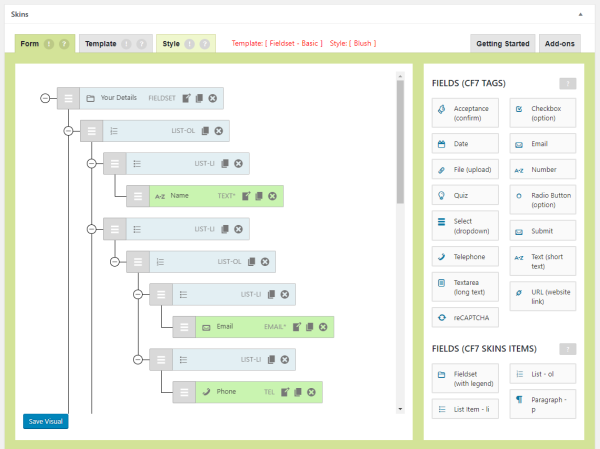
Using CF7 Skins
1. CF7 Skins Visual Editor – where you edit and build your form.
Start with a CF7 Skins Template.
- Select a Template to add it to the Form tab.
- The Form tab is where you build your form.
Add fields and arrange them using drag and drop.
- Drag-and-drop new fields onto your form.
- Rearrange fields into the correct position.
Edit the form to match your requirements.
- Click Edit, Duplicate & Delete to adjust fields.
- Add CF7 Tag options in the Edit dialog.
Review & save your Form.
- Duplicate groups of fields to speed form creation.
- Click Save Visual – your changes are added in the CF7 Form tab.

2. Templates – give you a starting point for your form.
Each Template acts as an easy to follow guide, which can be adapted to your particular requirements.
- The Template tab displays the available templates.
- Click Select to add this template in the Form tab.
- Then use the Visual Editor to adjust the form to your requirements.

3. Styles – control the appearance for your form.
Every Style covers the full range of Contact Form 7 form elements.
- View the Style tab to see the available styles.
- Find a style you like and click Select.
- Then press Save or Save Visual to apply the style to your form.
Doing more with CF7 Skins
To take advantage of the full functionality of CF7 Skins we recommend reading the following items.
Do you enjoy using this plugin?
You can help fellow WordPress users in the following simple ways
- Review – leave a plugin review on WordPress.org
- Testimonial – add your Testimonial to those listed
- Feedback – help us to improve CF7 Skins by offering feedback
Documentation
Our in-depth documentation is a great place to find detailed answers
- FAQ – browse over some commonly asked questions.
- Documentation – search by Categories & Tags or Keywords.
- Tutorials – to help you get started quickly with CF7 Skins.
Add-ons
Ongoing development of CF7 Skins is made possible by sales of renewable annual licenses of our Add-ons.
- CF7 Skins Extra – Extra Templates & Styles
- CF7 Skins Styles – Useful styling options
- CF7 Skins Multi – Multi-part forms
- CF7 Skins Logic – Conditional logic for your forms
Our range of Add-ons brings the functionality available in other premium WordPress form plugins directly within Contact Form 7.
Need some help?
You have a number of options to help you use CF7 Skins.
- Free Version
- WordPress.org Support Forum – community based support offered by other CF7 Skin users (we visit the forum intermittently to assist with plugin bugs only).
- Add-ons
- Premium Email Support – available (for current paid licenses) to deal with users questions and problems.
Website | FAQ | Documentation | Tutorials | Add-ons
Current
