
Last Updated on April 15, 2025 by Neil Murray
Table of Contents #
GitHub Search Tips #
Images – ..\Sync..\Development\Development Guidelines\Working with CF7 Skins\Working with GitHub\GitHub Search Tips\
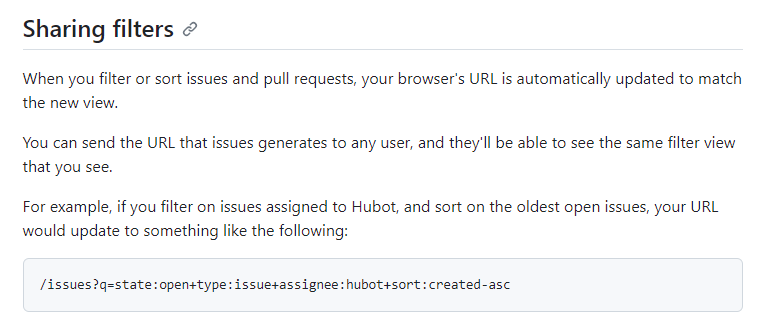
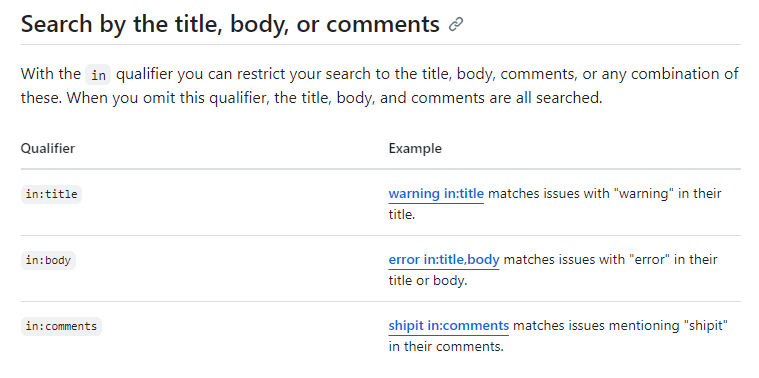
Refer:
Squash commits on branch before merge #
When should commits be squashed?
By squashing commits, developers can condense a series of small, incremental changes into a single meaningful change, making the commit history more coherent and comprehensible. Squashing is especially useful when preparing a clean and concise commit for code review or before merging into a main branch
Don’t rebase commits you’ve already pushed to origin
Even though it looks like you’re just shifting your commits to a different point in your repo’s history, under the covers, Git actually creates new commits – each with a new SHA, so don’t rebase commits you’ve already pushed to origin unless you coordinate closely with your teammates. They’ll need to update their local copies of the repo afterwards.
Rebase with confidence
Interactive rebase can be really useful, especially if you tend to commit locally all day long and push your changes on your way out the door. Up to the point of pushing, you can condense, delete, or edit the message on your commits to make the history easier for everyone to understand.
Refer:
- Articles
- Video
Heading #
Further reading:
Notes
ADD notes here.
Save all Images to Sync – use ..\Sync\..\ADD FOLDER\