
Last Updated on April 15, 2025 by Neil Murray
I use SourceTree – Git GUI application for all my work with Git.
Git CLI is quicker & more powerful, if you have solid understanding of Git, but I don’t think it’s suitable for people who aren’t using Git every day.
Git branches #
We use Gitflow as the basis for branch naming.
Most work done by individuals is in specific Git branches.
The branch to be used is often shown at the top of each Bitbucket Issue:
e.g. Use ‘feature/New-Feature’ branch for development.
Work should only be committed to the ‘develop’ branch after independent review. We are not using Pull Requests at this stage, but we plan to do this in future.
New branches are generally pulled from the ‘develop’ branch – never from the ‘master’ branch.
Only Neil Murray can commit to the ‘master’ branch at this stage.
See Git Repositories – Branches.
Commit messages #
Each commit should include sufficient detail to clearly & concisely describe the changes made in that commit.
Include the BB issue number in front of the message as part of the commit summary, so we can easily click to jump to the BB issue.
Add the Bitbucket issue hashtag-number at the beginning of each commit message. It helps us knowing what issue we’re working on and provides an automatic link to it.

Add extra detail in subsequent lines (separated by blank line). Tell us what this commit does to change this project.
If one line commit message is not possible, consider using text file Git – git-commit Documentation.
Example:
Issue #47 – Add Options for Checkboxes, Radio Buttons and Menus
Set color(#646464) for icons and text
Don’t use:
‘issue 47 is done’ – this is not a suitable commit message
‘Updated some.php file’ – tells us nothing about what you actually did & we can already see all the files changed in the commit.
Adding a space after the first line of your commit messages is normal practice & will improve your commit messages:
Example:
HTML edit option moved to pro.js – summarize or cover the main part of commit
Added separate code for cf7sRules of HTML – add extra detail
Added CSS for Pro addons
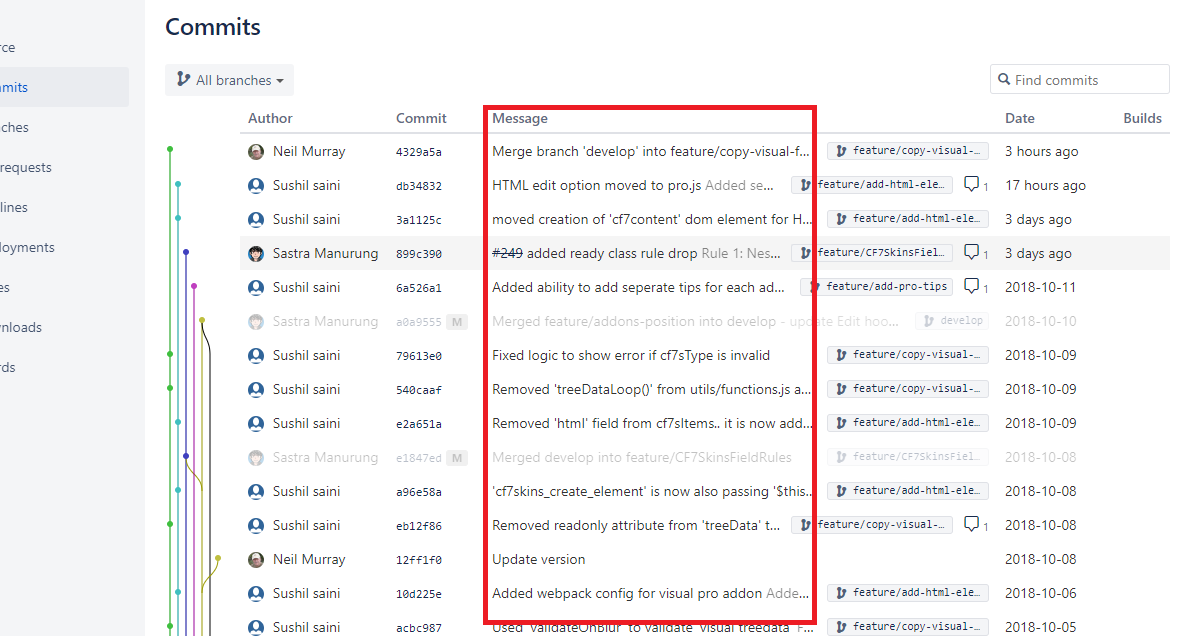
We generally keep commits small so they cover discrete changes to the code base.
Refer: How to Write a Git Commit Message
Add comment for each commit on Bitbucket #
Add a comment on the Bitbucket issue, for each commit you make, giving details of the commit.

Refer: Add a comment on the Bitbucket issue for each commit
Commit comments

Neil Murray: Adding comments like shown above is a really good idea. We should add this approach to Dev. Guidelines
Sastra: I just don’t know where to comment it if there are multiple changes with the same comment. So I place it there, after file name.
Neil Murray: The way you did it was really good – clear & easy to understand Doing on the commit means we can easily find it later Also the comments matched your commit message
Sastra: You’re right. Sometime it’s hard to find comment between codes.
Rebase and Squash #
Refer: Squash commits on branch before merge
[Add a quick instruction how you did this using Phpstorm which has a rebase interactively GUI]
Merging #
[HOLD – Rebase before Merging branch (incl. using interactive rebase)]
Folder & file compare #
Sometimes you need to go back to basics & use file compare to tackle an issue.
We often use basic file compare on new releases to make sure we don’t miss anything. You can then confidently make the commit via Sourcetree.
If the situation becomes too complex to tackle via Git & Sourcetree – you may not get a reliable result.
Notepad++ has good file & folder compare tools; VS Code also has good solutions. There are also good free software & online tools.
Steps:
- Find a commit that doesn’t have any unnecessary formatting changes.
- Copy all the relevant files at that point to a folder – that’s your starting point.
- Then grab the files from the latest commit. Store them in a separate folder.
- Use file & folder compare to determine the actual code changes that implement the feature.
- Add the actual code changes to the starting point files in yet another new folder. This folder becomes the files you are going to commit.
- Grab the updated files & drag them into the relevant folders on the git repo. This gives you your commit.
- Stage the updated files on Sourcetree & very carefully check the commit
- Fix any errors – you’re sure to find some
- When you’re sure you’ve got it right make your commit & push.
Blame #
LEARN
Git Reference #
SourceTree – Git GUI application
SourceTree Knowledge Base
Tutorial: Learn SourceTree with Bitbucket Cloud
How To Use GIT and SourceTree – For Beginners
Use Sourcetree branches to merge an update
Git – Branches | Atlassian Git Tutorial
How To Use Git Branches | DigitalOcean
Gitflow Workflow
GitHub – nvie/gitflow
Git Workflow – Calypso Branch Naming Scheme
Work with pull requests
My approach to using Git, without the headaches
14 tips and tools to resolve conflicts with Git
Bitbucket settings
Set up an SSH key
Further Reading:
Notes
Sushil, 2018-12-02
Once we make a commit then in commit message we are including complete details regarding what changes were done in each file
Do I also need to add the details again in the issue comment ( where I ask sastra to check the commit ) ?
Neil,
Sastra does that – I don’t – I’m OK with it being done if it helps but it’s not a requirement.
Sushil,
I am also doing it for all my commits. here is the most recent one – https://bitbucket.org/cf7skins/cf7skins-dev-cf7skins-visual/commits/d2f607b70d6af94c4154e96cbdcd33ee2f397a28
Neil,
My personal preference would be for it only to be done on the bb-issue but I’m OK with what you are both doing.
The bb-issue provides a searchable record of what we did. Needs to include what you are asking to be checked.
Save all Images to Sync – use ..\Sync\..\Development\Development Guidelines\Working with CF7 Skins\Working with Git\