
Last Updated on January 21, 2024 by Neil Murray
Why @wordpress/scripts #
@wordpress/scripts is a collection of reusable scripts tailored for WordPress development.
It operates similarly to Create React App (CRA), based on the same basic idea of moving all the necessary configurations and scripts to one single tool dependency.
Importantly, this is maintained by the Gutenberg team who keep everything up to date, e.g. node_modules updates are handled by @wordpress/scripts.
Ejected CRA is too hard #
We need to switch from using ejected CRA to a customised @wordpress/scripts.
- our ejected CRA is badly out date
- uses webpack 3 – current is webpack 4
- too hard to keep all configurations and dependent tools up to date
Create React App – The tradeoff is that these tools are preconfigured to work in a specific way. If your project needs more customization, you can “eject” and customize it, but then you will need to maintain this configuration.
It’s a misleading assumption that developers can easily pick the proper tools in the first place and then ensure that they play along with each other, including all their extensions. Besides, it’s still not enough because developers are left on their own to keep all configurations and dependent tools up to date.
@wordpress/scripts – introduction
Our customization #
The default settings of @wordpress/scripts are not sufficient for our requirements. Fortunately some customization is supported.
@wordpress/scripts uses an approach pioneered in kcd-scripts that allows us to:
- add a custom configuration and @wordpress/scripts will use that instead of it’s own internal config.
- since @wordpress/scripts exposes its configuration we can use it to override only the parts of the config we need to change.
Overriding Config
Unlike react-scripts, kcd-scripts allows you to specify your own configuration for things and have that plug directly into the way things work with kcd-scripts.There are various ways that it works, but basically if you want to have your own config for something, just add the configuration and kcd-scripts will use that instead of it’s own internal config.
In addition, kcd-scripts exposes its configuration so you can use it and override only the parts of the config you need to.
package.json #
Our package.json needs to be effectively an addition to the default package.json in @wordpress/scripts.
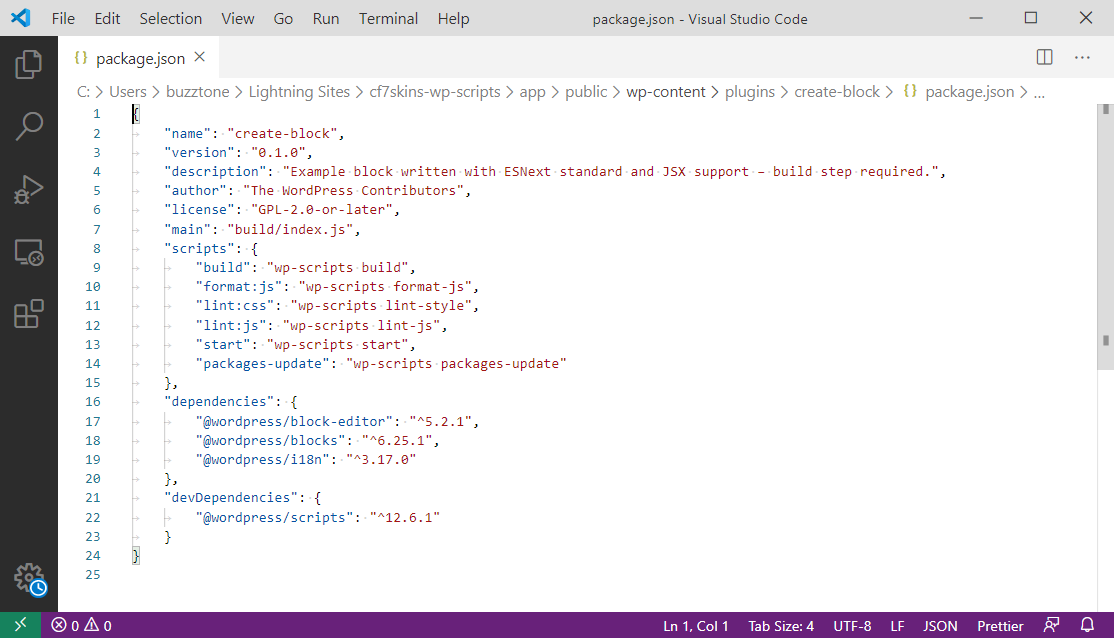
@wordpress/create-block hooks up @wordpress/scripts@wordpress/scripts is designed to be configured using the
scriptssection in thepackage.jsonfile of your project.
Our previous package.json is based on an ejected version of create-react-app (CRA).
We can’t use this; we need to remove all the stuff added by CRA & instead create a package.json, which contains only specific additional items we need, in addition to the default package.json in @wordpress/scripts.
We are responsible for updating & testing compatibility on the additional items only – everything else will be maintained via @wordpress/scripts.
Refer @wordpress/scripts – mock files – package.json
webpack #
Our previous webpack configuration is based on an ejected version of create-react-app (CRA) – refer Working with webpack – CRA version.
We can’t use this; we need to remove all the stuff added by CRA & instead create a webpack.config.js which extends the default webpack.config.js in @wordpress/scripts.
All the customization we need, I believe, can be done in webpack.config.js.
@wordpress/scripts uses webpack behind the scenes. It’ll look for a webpack config in the top-level directory of your package and will use it if it finds one. If none is found, it’ll use the default config provided by
@wordpress/scriptspackages. Learn more in the Advanced Usage section.
But we should do this by extending or replacing subsections within the default @wordpress/scripts webpack config, rather than providing a full replacement.
To extend the provided webpack config, or replace subsections within the provided webpack config, you can provide your own
webpack.config.jsfile,requirethe providedwebpack.config.jsfile, and use thespreadoperator to import all of or part of the provided configuration.
In the example below, a webpack.config.js file is added to the root folder extending the provided webpack config to include custom logic to parse module’s source and convert it to a JavaScript object using toml.
const toml = require( 'toml' );
const defaultConfig = require( '@wordpress/scripts/config/webpack.config' );

module.exports = {
    ...defaultConfig,
    module: {
        ...defaultConfig.module,
        rules: [
            ...defaultConfig.module.rules,
            {
                test: /.toml/,
                type: 'json',
                parser: {
                    parse: toml.parse,
                },
            },
        ],
    },
};
Refer @wordpress/scripts – mock files – webpack.config.js
Updating to New Release #
We can use the following methods to update:
- update the @wordpress/scripts version in package.json & run npm install
- use npm packages-update to automate the process of updating WordPress dependencies
NOTE: it’s good to check the changelog for potential breaking changes. See Updating to New Release for more detailed info.
Further Reading
- @wordpress/scripts – Block Editor Handbook
- Updating to New Release
- Default webpack config
- Provide your own webpack config
- Extending the webpack config
Notes
Save all Images to Sync – use ..\Sync\Development Guidelines\CF7 Skins Code\CF7 Skins Visual Code\@wordpress-scripts\