
Last Updated on February 23, 2022 by Neil Murray
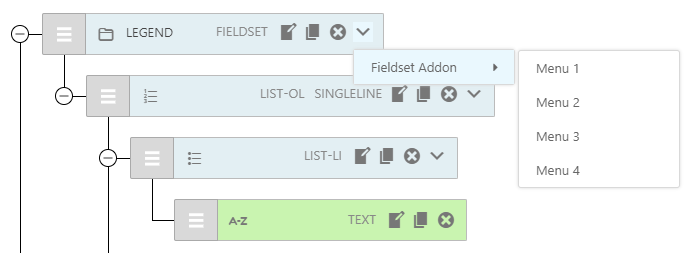
The Visual Menu for Add-ons is added in the InputItemMenu React component & utilizes the rc-menu package.
The drop-down menu is meant to operate like a right-click context sensitive menu in Windows. Each Add-on can add menu items which relate to the currently selected Form Item.
Component Structure #
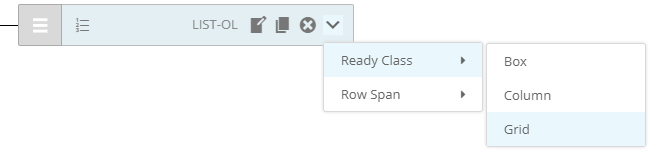
<Menu>
    <SubMenu title="Ready Class">
        <MenuItem>Box</MenuItem>
        <MenuItem>Column</MenuItem>
       <MenuItem>Grid</MenuItem>
    </SubMenu>
    <SubMenu title="Row Span">
        <MenuItem>1</MenuItem>
        <MenuItem>2</MenuItem>
    </SubMenu>
</Menu>
React Menu Component (rc-menu) #
Main rc-menu props:
- onClick for saving changes
- selectedKeys to show selected menu on page load
- getPopupContainer is the place to generate popup menu.
rc-menu | GitHub | Demo – React menu component.
Click Menu Event #
Clicking menu item will trigger Visual.clickMenu() function to update or save current rowInfo.
clickMenu() receives two parameters:
- rowInfo (object) – current node is
rowInfo.nodepassed from InputItemMenu - menu (object) – clicked menu contains
nameas menu name andindexas clicked menu value plus key, title, items and types.
After updating the value, this function updates global rowInfo state. Any functions existing in Visual can be used inside Visual.clickMenu() function. Refer Menu Input Handling for detailed instructions.
Registering Menu #
Add-ons can register their menu to specific node type using window.cf7svisual.addons.register.
To register an Add-on menu, we need to provide these parameters:
- key (string) –
cf7sItemskey prop for saving and indexing - types (array) – only apply to specific
cf7sItemstypes - title (string) – as the menu title
- items (object) – list of menu item with value and label.
- multiple (boolean) – default true, enable multi-selection, false for single-selection.
Example:
const readyMenu = () => {
    let menu = {};
    menu.key = 'cf7sReady';
    menu.types = ['list-ol', 'list-li'];
    menu.title = 'Ready Class';
    menu.items = [
        { value: 'box',        label: 'Box'},
        { value: 'column',     label: 'Column'},
        { value: 'grid',       label: 'Grid'},
    ];
    menu.multiple = false
    return menu;
}
// Register menu
window.cf7svisual.addons.register( 'menu', readyMenu );
Further Reading
- Menu Input Handling
- Working with Add-ons
- Enqueueing CSS from external npm packages
- rc-menu ( Demo ) – React menu component
- Menu Input Handling (BitBucket Issue)
- Add Visual Form Item Menu (BitBucket Issue)
- A good place to render the menu (BitBucket Issue)
Notes
Add comments, questions & notes here.
Save all Images to Sync – use ..\ Sync\..\Development\Development Guidelines\CF7 Skins Code\CF7 Skins Visual Code\Visual Menu for Add-Ons\