
Last Updated on January 21, 2024 by Neil Murray
Addon can register their edit field as a function that returns edited editSections or a React component that renders its own Edit sections.
- A function can modify predefined edit field (section), delete it or add custom edit field.
- Component is a bit different, it can’t modify the
editSectionsdirectly. It can be modified by re-rendering inside component render function.
Parameters #
A function or component receive the same parameters as a single object which contains Edit props as listed below and Visual editProps.
- editSections
arrayall predefined and registered sections. - styles
objectavailable styles found in visual/Form/Edit/index.css.
Note: when using one of the parameter above, add-on should check the value or availability before proceeding.
Using Function inside Add-on Component #
Add-on can add their section at the end of array using push(), inject it to specific array index position using splice() or any JavaScript array functions.
const MyAddonEdit = {
    types: ['list-li'], // not used in Edit, only for InputItemMenu checking
    render: ( editSections, props, styles ) => {

        const myEdit1 = () => // edit section
            <div className={ styles.attribute } key="myFirstEdit">
                <div className={ styles.label }>My Edit 1</div>
                <div className={ styles.value }>This is my first edit!</div>
            </div>

        const myEdit2 = () => // edit section
            <div className={ styles.attribute } key="mySecondEdit">
                <div className={ styles.label }>My Edit 2</div>
                <div className={ styles.value }>This is my second edit!</div>
            </div>

        editSections.splice( 5, 0, myEdit1() ); // add myEdit1() at index position 5

        editSections.push( myEdit2() ); // add myEdit2() at the end

        return editSections; // return back to Edit
    },
}

// Register MyAddonEdit
window.cf7svisual.addons.register( 'edit', MyAddonEdit );
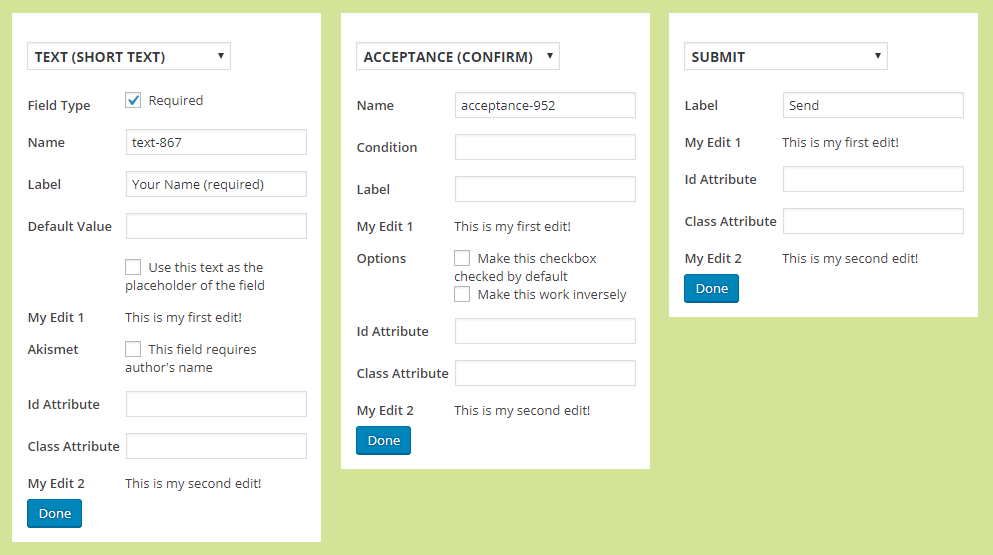
Example #
Below is an example of how styles object can be used in an edit component
import React, { Component } from 'react';

class MyEditComponent extends Component {
    render() {
        const { styles } = { ...this.props };

        // Check current this.props.rowInfo.node type,
        // return false if no support

        return (
            <div key="myKey" className={ styles.editOptions }>
                <p>Hello, I am a registered Edit component.</p>
            </div>
        );
    }
}

// Register the component in Edit section
window.cf7svisual.addons.register( 'edit', MyEditComponent );
Code explanation:
- const { styles } = { …this.props } : First by using { …this.props } we spread all the props and then with { styles } destructuring syntax we extract the styles.
- className={ styles.editOptions } : Here we are assigning the editOptions classname ( it will output the suffixed classname ).

Further Reading
Notes
2019-01-08
- Content audited & OK