
Last Updated on November 9, 2021 by Neil Murray
JavaScript i18n
WordPress 5.0 introduced the wp-i18n JavaScript package that provides the functions needed to add translatable strings as you would in PHP.
We use the following steps to make our plugin JavaScript code translatable.
A. Add wp-i18n as a dependency when registering your script
    wp_register_script(
        'myguten-script',
        plugins_url( 'block.js', __FILE__ ),
        array( 'wp-blocks', 'wp-element', 'wp-i18n' )
);B. Include i18n functions in your code
import { __ } from '@wordpress/i18n';

        return (
            <p style="color:red">
                { __( 'Hello World', 'myguten' ) }
            </p>
        );
Common functions available (these mirror their PHP counterparts) are:
__( 'Hello World', 'my-text-domain' )– Translate a certain string._n( '%s Comment', '%s Comments', numberOfComments, 'my-text-domain' )– Translate and retrieve the singular or plural form based on the supplied number._x( 'Default', 'block style', 'my-text-domain' )– Translate a certain string with some additional context.
Every string displayed to the user should be wrapped in an i18n function.
C. After all strings in code are wrapped, the final step is to tell WordPress your JavaScript contains translations, using the wp_set_script_translations() function.
<?php
    function myguten_set_script_translations() {
        wp_set_script_translations( 'myguten-script', 'myguten' );
    }
    add_action( 'init', 'myguten_set_script_translations' );
WordPress will automatically figure out if a translations file exists on translate.wordpress.org, and if so ensure that it’s loaded into wp.i18n before your script runs.
With translate.wordpress.org we also do not need to worry about setting up our own infrastructure for translations.
Refer:
Providing our own translation
While we do not necessarily need set up our own infrastructure for translations for our free plugin listed on wordpress.org, we do this so we can test & monitor our translation readiness on our local WordPress development installs.
It makes sense have at least one translation ready (we use ID-Indonesian) to test our JavaScript translations are working correctly.
We use the following steps to make our own translation of all JavaScript strings available on our local WordPress development installs.
D. Add @wordpress/i18n package
WordPress 5.0+ uses the global wp.i18n as a wrapper for @wordpress/i18n.
It’s based on top of a library called Jed which brings Gettext functionality to JavaScript.
CF7 Skins Visual also utilizes @wordpress/i18n as an external package for translation.
We use the same __() function in JavaScript as in PHP and don’t have to learn anything new.
To install the package open a console and type:
npm install @wordpress/i18n --save
Example usage:
const { __ } = { …window.wp.i18n };
Gutenberg Approach
Gutenberg uses Jed for translation with @wordpress/i18n.
import { __ } from '@wordpress/i18n';

if ( ! selectedBlock ) {
    return <span>{ __( 'No block selected.' ) }</span>;
}
E. Making POT File
[EXPLAIN why making POT File & converting POT to JSON is necessary]
@wordpress/babel-plugin-makepot is used to scan JavaScript files for use of localization functions. It then compiles these into a gettext POT formatted file as a template for translation.
It is placed in .babelrc file as follows with specific output:
{
	"plugins": [
		[ "@wordpress/babel-plugin-makepot", { output: "lang/contact-form-7-skins.pot", }, ],
	],
}
[EXPLAIN how is this done for CF7 Skins Add-ons ]
F. Convert POT to JSON
po2json converts POT file to Javascript objects or JSON strings into a file. The result is Jed-compatible.
The file later will be loaded with wp_set_script_translations for WP 5.0+.
WordPress checks for a file in the format of ${domain}-${locale}-${handle}.json or md5 filename, before defaulting to the WordPress languages directory. [EXPLAIN why WordPress does this]
For older version of WP, we read the file using WP Filesystem and then print it as print_translations does.
References:
- po2json – Convert PO files to Javascript objects or JSON strings.
- load_script_textdomain()
- print_translations()
- wp_set_script_translations()
G. CF7 Skins Visual Locale
The lang directory contains .pot, .po and .json files.
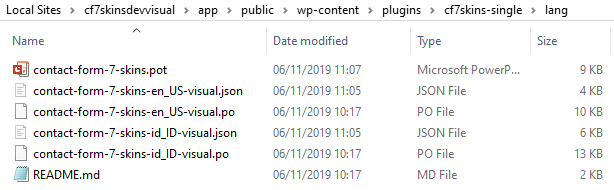
The contact-form-7-skins.pot is the main translations file made using @wordpress/babel-plugin-makepot setup in .babelrc for every webpack build.
Translating
To translate it into a specific language, simply copy the file and rename as format ${domain}-${locale}-${handle} with .po file type – for example, contact-form-7-skins-en_US-visual.po.
Open the file using Poedit, do translate and save.
Merging
If there are new translation strings added in contact-form-7-skins.pot, the translated .po file can be merged using Poedit menu > Catalogue > Update from pot file… and choose contact-form-7-skins.pot.
After all translation have been completed, run webpack again to parse the .po file into JED .json format and to distribute it into each plugin.
Refer: New! JavaScript i18n support in WordPress 5.0
Backward Compatibility
For WordPress 5.0+ @wordpress/i18n is included in core, but to support older versions we have to include the package as a separate file using webpack externals.
For older versions, we try to follow wp_set_script_translations approach and print custom script translation as print_translations does.
Interoperability in 5.0 and Beyond
As suggested by Gutenberg we verify dependencies of vendor scripts (lodash, moment, react, react-dom) using wp_script_is.
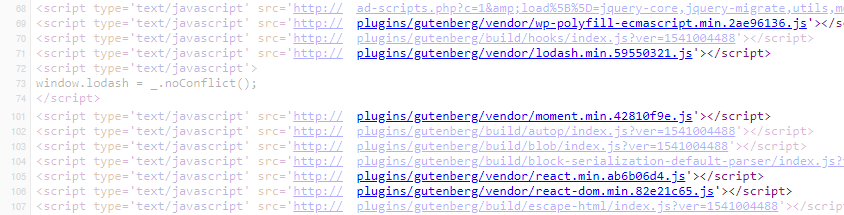
Refer: JavaScript Packages and Interoperability in 5.0 and Beyond
We follow the Gutenberg approach & include vendor dependencies as separate files with built files. Gutenberg registers them after built using gutenberg_register_vendor_scripts.
Within CF7 Skins Visual, we can check if vendor script is installed, if not then register the vendor script. This approach also will reduce Visual built files.
Approach Used with CF7 Skins
All visual .js files
- Replace import to use WordPress window constant.
    //import { __ } from '@wordpress/i18n';
     const { __ } = { ...window.wp.i18n };
- Add
__( ) to each translatable string.
<div> { __('Ready Class', 'cf7skins-ready') } <div/>
webpack.config.js
- Update webpack config to build a JS file that contains
@wordpress/i18nasdist/wp-i18n.js. - All exported functions will be available in
window.wp.i18nusing webpacklibraryandlibraryTarget. - This file will be enqueued for WordPress 4.x with addition. [EXPLAIN – I don’t understand this]
- Add custom locale script as replacement for
wp_set_script_translations(). - Exclude/externalize
@wordpress/i18npackage. See Gutenberg externals.
webpack.config.dev.js
- Use
webpack.ProvidePluginto makewindow.wp.i18navailable in all visual files.
    new webpack.ProvidePlugin({
      'window.wp.i18n': require.resolve('@wordpress/i18n'),
    }),
- Add custom locale script
custom locale script
[EXPLAIN custom locale script ]

wp.i18n. admin-visual.php
- Enqueue
dist/wp-i18n.jsand add custom locale script. - Add
wp-i18nas dependency.
Testing
Create JED .json format with tools such as po2json to see if translation works.
translations.js
[EXPLAIN translations.js ]
Add-ons Translation
For our CF7 Skins Add-ons we need to set up our own infrastructure for JavaScript translations.
We have added JS translation feature as described above for CF7 Skins Visual.
For addons, it could be one of options below:
- Follow CF7 Skins Visual approach for each add-on.
- Add a function from Visual PHP to load add-on translation.
GlotPress
Added first GlotPress project http://translate.cf7skins.com/glotpress/projects/cf7-skins-pro/ to translate CF7 Skins Pro.
Glotpress reads __, _e, .etc from POT file. POT file should contains all translated strings both from PHP and JavaScript file.
Proposal: We need to add wp-i18n to pro.js for Glotpress to read the file.
Further Reading
- Block Editor Handbook – Internationalization
- New! JavaScript i18n support in WordPress 5.0
- JavaScript Packages and Interoperability in 5.0 and Beyond
- @wordpress/i18n
- Gutenberg i18n: Merge PHP and JS strings in POT generation
- JavaScript Internationalization: The Missing Pieces
- JavaScript Internationalization
Notes
Sastra
My idea is, each addons should provide its own translation system.
If we follow Gutenberg Examples plugins, each plugin handles its own translation.
https://github.com/WordPress/gutenberg-examples/blob/master/01-basic-esnext/index.php