
Last Updated on January 10, 2021 by Neil Murray
We need to cover when a CF7 form, which includes info from a CF7 Skins Add-on, is re-opened when the relevant Add-on is no longer activated.
We need to consider:
- previously added fields with CF7 Skins Add-on info.
- general re-editing of a form which includes previously added CF7 Skins Add-on info.
Approach
We follow this approach:
- Add further rules in CF7 Skins Lite for when add-on is not activated
- Add rules in add-ons that apply when add-on is activated
We apply rules by checking the item property like:
cf7sTypefor a specific item,cf7sSelectGroupfor specific item with the same group,noChildrenif items can contains children.
More property can be added in the future for rules – perhaps like:
noParent: trueto avoid item to have a parentonlyAddUnderFieldset: false,dontSiblingWithParagraph: trueetc.
Those new properties can be ruled in main Visual.
Let say we added isRoot into cf7sMultiItem:
export const cf7sMultiItem = {
    ....
    cf7sSelectGroup: 'cf7sItem',
    isRoot: true,
};
Visual rule can be:
if ( ! parentNode || parentNode.cf7sType === 'fieldset' || !! parentNode.isRoot ) {
    // return node with surrounding
}
Addon can add more specific rule:
if ( !! parentNode.isRoot ) {
    // do something
}
General rules
These are the general rules for any inactive add-on:
- Disable edit and duplicate
Clicking edit icon for inactive node will shows Edit with empty content that has nothing to for node editing. This can prevents duplicating submit and reCaptcha children. - Disable drag/drop to other node
Inactive node should not be dropped into other inactive node or any node that support children. The same inactive node type can be dragged to switch position between each other. - Respect surround and drop rules
If inactive node supports children, a new node dragged into it as a children, should respect surround and drop rules. - Collapse and expand
Collapsing and expanding an inactive node should not add any unnecessary nodes or move nodes to other places. - Apply add-on rule after re-activating
After deactivating the add-on, any new added or dragged nodes should be handled by add-on after re-activating. Add-on will be responsible after re-activating.
Multi
- Disable edit and duplicate Multi node.
- Disable drag Multi node as another child node.
- Multi node should be the top level node.
- Multi handles treeData after re-activating.
Refer: Open Multi form with Multi not active (BitBucket Issue)
NOTES
Sastra
2019-01-17
1b and 3a approach seems promising in conjunction with item property as rule logic condition as my suggestion above.
- 1b. Add further rules in CF7 Skins Lite for when add-on is not activated
- 3a. Add rules in add-ons that apply when add-on is activated
We apply rules by checking the item property like:
cf7sTypefor a specific item,cf7sSelectGroupfor specific item with the same group,noChildrenif items can contains children.
More property can be added in the future for rules. Perhaps like noParent: true to avoid item to have a parent, onlyAddUnderFieldset: false, dontSiblingWithParagraph: true etc. Those new properties can be ruled in main Visual.
Let say we added isRoot into cf7sMultiItem:
export const cf7sMultiItem = {
    ....
    cf7sSelectGroup: 'cf7sItem',
    isRoot: true,
};
Visual rule can be:
if ( ! parentNode || parentNode.cf7sType === 'fieldset' || !! parentNode.isRoot ) {
    // return node with surrounding
}
Addon can add more specific rule:
if ( !! parentNode.isRoot ) {
    // do something
}
2019-01-04
I am thinking to use cf7sItems property to follow main Visual rules if the add-on is deactivated.
The idea is to group them, if deactivated, the group will be used as basic rule.
For example, to use cf7sSelectGroup: ‘cf7Tag’ to HTML.
Take a look at this line (feature/add-html-element)
cf7skins-dev-cf7skins-visual/src/.../Pro/rules.js

	// Loop all parent's children.
	// Not sure why nextParent.children contains dropped node candidate, even if it has not been dropped yet. Bug?
	// Count total CF7 tags & HTML fields inside parent.
	let countCF7Tags = 0;
		for ( let child of nextParent.children ) {
	>>>	if ( 'cf7Tag' === child.cf7sSelectGroup || 'html' === child.cf7sType ) {
			countCF7Tags++;
		}
	}
cf7skins-dev-cf7skins-visual/src/…/Pro/rules.js – ln 25
which is have similiarity with (develop)
cf7skins-dev-cf7skins-visual/src/visual/util/cf7sRules.js

	// Loop all parent's children.
	// Not sure why nextParent.children contains dropped node candidate, even if it has not been dropped yet. Bug?
	// Count total CF7 tags inside parent.
	let countCF7Tags = 0;
	for ( let child of nextParent.children ) {
		for ( let tag of cf7sItems ) { // loop cf7sItems
	>>>		if ( child.cf7sType === tag.cf7sType && 'cf7Tag' === tag.cf7sSelectGroup ) {
				countCF7Tags++;
			}
		}
	}
cf7skins-dev-cf7skins-visual/src/visual/util/cf7sRules.js – ln 130
It looks cf7Tag for cf7sSelectGroup.
So instead of setting cf7sSelectGroup to cf7sItem
cf7skins-dev-cf7skins-visual/src/.../Pro/index.js - ln 17

/**
 * Add HTML tag for pro addon
 *
 * @param {array} cf7sItems list of all cf7sItems
 *
 * @return updated cf7sItems with html tag
 *
 * @since 0.7.0
 */
function htmlTag( cf7sItems ) {
	const newItem = {
		cf7sType: 'html',
		cf7sSelectLabel: 'HTML',
	>>>	cf7sSelectGroup: 'cf7sItem',
		cf7Name: 'html',
		cf7sContent: '',
		cf7sIcon: 'dashicons dashicons-editor-code',
		noChildren: true,
	};

	cf7sItems.push( newItem );
}
cf7skins-dev-cf7skins-visual/src/…/Pro/index.js – ln 17
we can use _cf7Tag for it so no longer need htmlDropRules .
It is not only limited for cf7sSelectGroup usage, we can consider to add more properties for rules checking.
2019-01-03
I prefer to include it in Lite. I believe it can brake Visual rule if Pro is activated later.
Let assume the HTML tag is added within a LI and user deactivate the plugin. User can drag another cf7Tag into the LI since there is no rule for HTML is applied.
Later, user re-activate it, and found there is a HTML and cf7Tag within a LI which is break Visual rule.
Sushil
2019-01-20
I think adding properties like noParent: true , onlyAddUnderFieldset: false will give us the flexibility we need to deal with situations where an addon is not active but its field is present.
To illustrate the use case here is an example.
Consider we have multi-tab created with ‘multi-addon’ and user disables the addon. In that case no drop rules are applied to multi-tab nodes and they can have free movement in the visual which can break the visual when multi-addon is activated again. In the below gif you can see that we can make ‘multi-node’ a child of list-li.
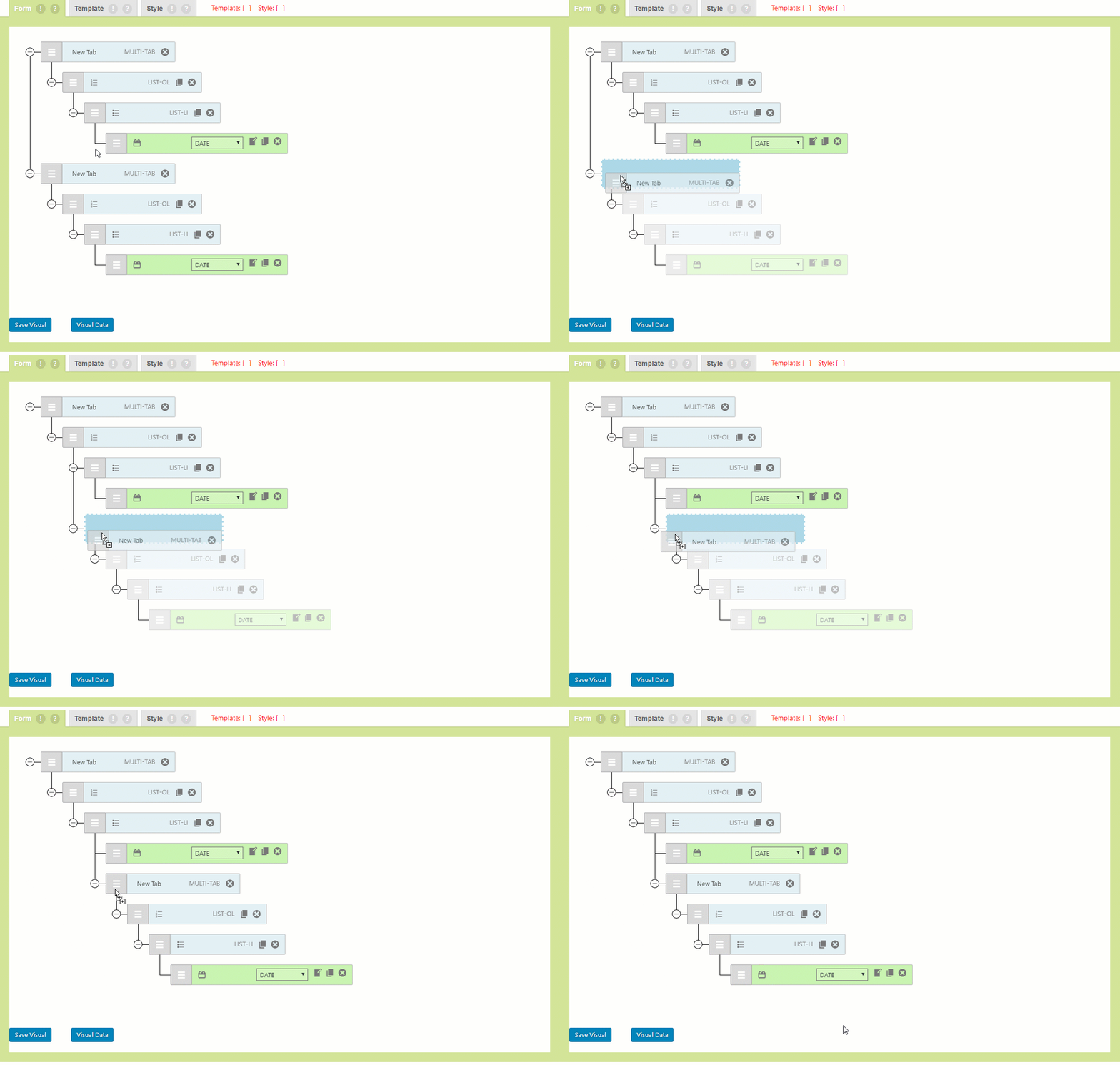
To restrict or completely disable the movement in such cases we can use a key like isRoot in cf7sMultiItem to state that this field can’t be a child of any other node.
export const cf7sMultiItem = { .... cf7sSelectGroup: 'cf7sItem', isRoot: true, };
The cf7sRules.js can include the following code in cf7sDropRules( ) to make this happen
if ( !! node.isRoot && !! nextParent ) { return false; }
In the above code !! node.isRoot && !! nextParent will restrict the movement such that it can’t be a child node.
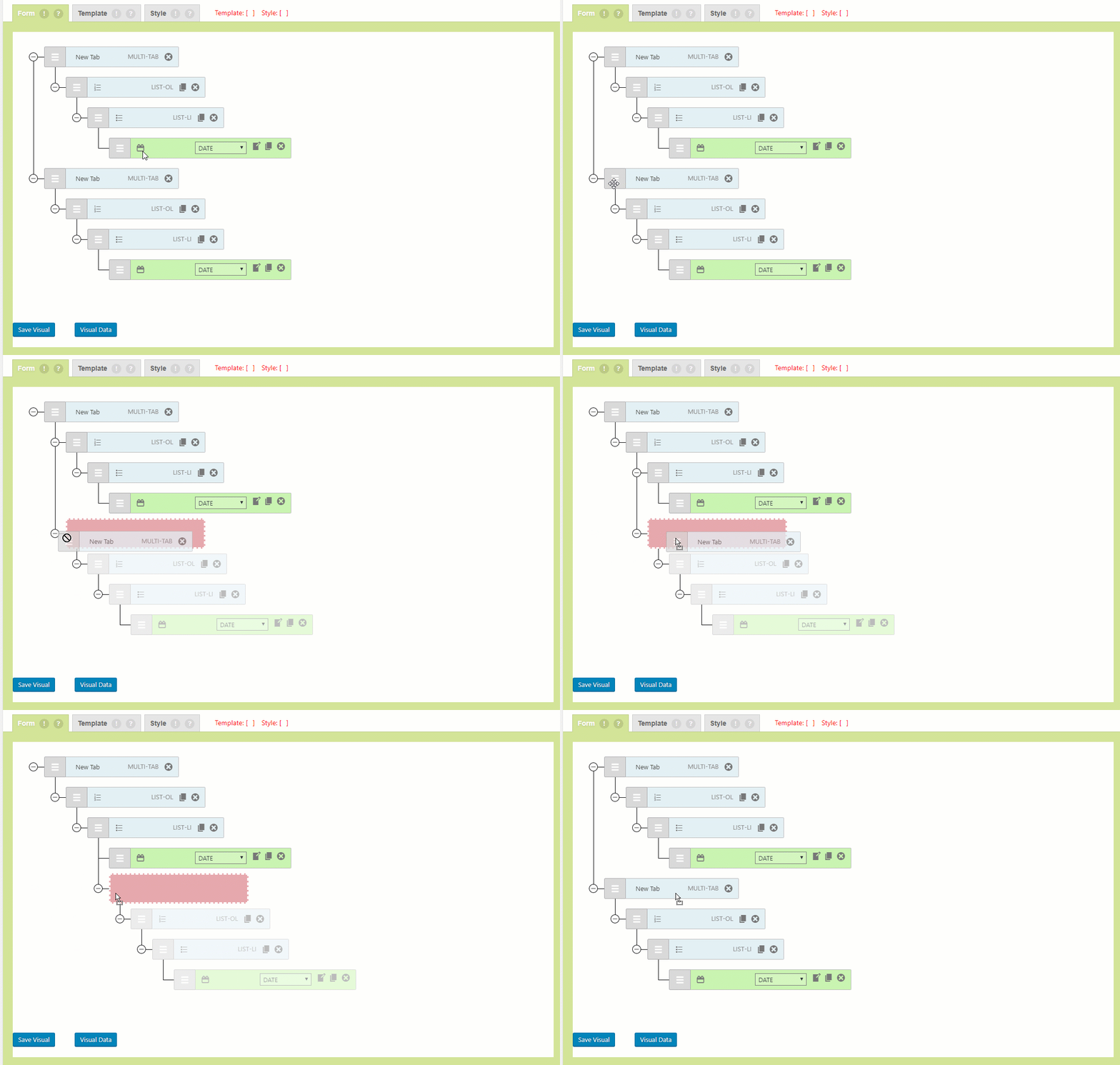
Since this code is meant to be executed only in cases where ‘multi-addon’ is not active so, it should always be after the cf7sAddonRules hook.
I believe that this demonstrates that the combination of 1b and 3a is a good solution to deal with such situations.
In the above code we haven’t referenced any variable of multi-addon yet we were able to handle the node.
In case of html field which is part of ‘pro’ addon we can similarly introduce a key that fits the rules it has to follow.
2019-01-03
I think we need to figure out way to disable the addon field and its parent when the addon is not active.
Ex. If Pro addon is not active then ‘HTML’ field and its parent LI shouldn’t be able to be dragged within visual, no other field can be added in it. The only option available should be to delete them.
Although this approach will fail in case of Multi node .. because that will make the whole visual tree unusable as all nodes will be child of multi node ( when multi addon is disabled ).
The reason I put forward the above suggestion is to start a conversion and share ideas to create a universal approach to handle such situations instead of handling them per addon.
Neil
2019-01-03
We need to decide if it’s worthwhile to include rules in Visual Lite to cover previously added HTML fields when Visual Pro not activated.
I see following overall options (only general – not specifically about how code is written).
- 1a. Add rules in add-ons that apply when add-on is activated.
- 1b. Add further rules in CF7 Skins Lite for when add-on is not activated.
- 2a. Add ALL rules in CF7 Skins Lite
- 2b. Apply rules for add-on when add-on is activated.
- 3a. Add rules in add-ons that apply when add-on is activated.
- 3b. Ignore issues that occur when add-on is NOT activated – relatively small edge case.
Plus may be other better options.